Tampilkan postingan dengan label iPhone. Tampilkan semua postingan

Selasa, 04 Oktober 2011

iPhone 4 8GB Version Coming to Stores, Of Course for a Cheaper Price!


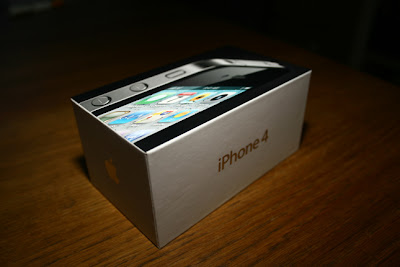
That’s right! The iPhone 4 will now have an 8GB variant as announced from Apple’s press conference in Cupertino, California earlier today.


Of course this 8GB iPhone 4 will carry the same hardware specs as its bigger siblings – the 16GB and 32GB iPhone 4 versions – yet will just costs half of last year’s base model, that is $99 in the US with 2-year contract.


I’m quite sure Globe Telecom will also add this handset on its iPhone portfolio (plus the iPhone 4S) so expect to see this on its postpaid offers very, very soon.


To receive latest technology updates, you can subscribe either by E-mail or by RSS Feeds. Follow me also on Twitter.

Kamis, 15 September 2011

iPhone 5 Release Update: October 15th, Says France Telecom CEO!


This is never a leaked document, and by no means a slip of the tongue… If we are to believe the CEO of France Telecom, the iPhone 5 will launch in October 15th!


Speaking to the French press, France Telecom chief executive Stéphane Richard discussed Apple’s plans for the release of the next iPhone model and even confirmed the date when the Cupertino-based phone maker will unveil the device.


"If we believe what we have been told, the iPhone 5 will be released on 15 October.”

Now, this report coincides with earlier rumors involving the leaked documents from Best Buy in the US as well as the early announcement of iPhone 5 pre-orders at Deutsche Telecom AG in Germany. And if all of these information holds true, then we can expect iPhone 5 from Globe Telecom in mid-December this year -- of course, unless only if Globe and Apple change its roadmap, right? It may even come as a surprise if Globe Telecom will have it in less than a month. Anyway, October is almost there, folks – so let’s just see. [via]


Update: Apple iPhone 5 event is official, October 4th.


To receive latest technology updates, you can subscribe either by E-mail or by RSS Feeds. Follow me also on Twitter.


Sabtu, 10 September 2011

Download Official Blogger App for iPhone, iPod Touch, and iPad


Wait no more, bloggers. If you’re using Google’s blogging platform, well, you should be happy to hear that the official Blogger app for iOS devices has already made its way to the App Store.


The new Blogger app which is compatible with iPhone, iPod Touch, and iPad running at least iOS 3.1.3, brings similar features as its Android counterpart including publishing of posts with photos, labels, and location information.


Blogger app will allow you to: Select account/blog if you have more than 1. Include pictures from the gallery or by taking a picture directly from the app Add labels Add location information Save as draft or immediately publish View list of saved/published posts

Though the UI is only available in English, the app supports blog posts written in all languages. The app doesn’t have some of the features available on the web-based version including video upload, stats, comment moderation, as well as formatting tools – but I’d guess Google will bring it all very soon. I can say though the app is still great after all. Go check it out here and do let us know what you think about it.


To receive latest technology updates, you can subscribe either by E-mail or by RSS Feeds. Follow me also on Twitter.

Jumat, 09 September 2011

Play Flash Contents in iPhone, iPod Touch, and iPad, Very Soon…

Finally, Adobe brings all the possibilities of playing Flash contents like videos and games to Apple devices with the release of the new versions of Adobe Flash Media Server and Adobe Flash Access.

The inability to play Flash contents through iOS’ native Safari browser is perhaps the biggest complaint among users as far as streaming media is concerned. Technically, it’s not an issue of the Safari browser but rather on how Adobe renders Flash contents to the device. Flash is described as too “resource-intensive” by utilizing much of the handset’s processor and battery, which has a significant impact in overall performance. With all of the anticipated issues which the great Steve Jobs outlined here, Flash contents are blocked in iOS devices. There are some apps though that made its way to the App Store like the Skyfire for iPhone and Skyfire for iPad, which does all rendering tricks on Flash videos, but still it’s not the complete solution just yet.


Not anymore. Adobe says with the new Adobe Flash Media Server 4.5 and Adobe Flash Access 3.0, however, seamless delivery of Flash contents to devices like iPhone and iPad have already taken care of by these Adobe products; obviously, processing contents in the server side out of Apple’s control.

With Flash Media Server 4.5, media publishers can extend their already broad mobile reach via Flash-enabled devices, with the new ability to deliver video content to Apple’s iPad and iPhone devices, enabling them to reach the widest audience possible. Adobe Flash Access 3.0, a robust content protection and monetization solution, will enable content owners to deliver on-demand content with massive scale and strict studio-level security across a broad range of devices, following the upcoming release of Flash Player 11 and Adobe AIR 3.
This is certainly good news for iPhone, iPod Touch, and iPad users; and of course to media publishers as well, as reaching more audience is not just possible. Read on more about Adobe Flash Media Server 4.5 and Adobe Flash Access 3.0 products through the press release after the break.


Click to Read Press Release


To receive latest technology updates, you can subscribe either by E-mail or by RSS Feeds. Follow me also on Twitter.

Selasa, 06 September 2011

Missing Personal Hotspot in iOS 4.3.5, Here’s How to Fix!

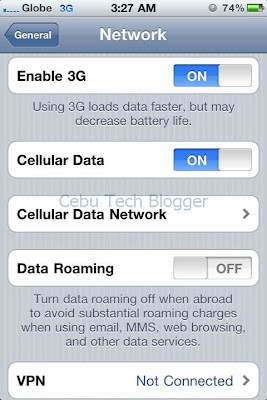
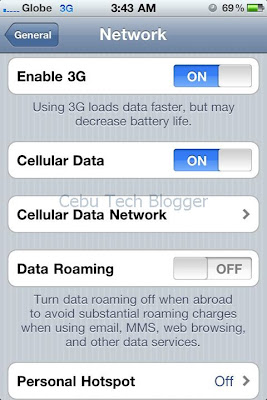
It was just yesterday when I discovered this bug in my iPhone 4 running iOS 4.3.5. I was about to tether my phone’s internet to another device when I noticed the Personal Hotspot feature was missing.


Personal Hotspot which first came with iOS 4.3.3 allows iPhone users to share internet connection to another device via USB, Bluetooth, or Wi-Fi. This feature may not be available in all devices around the world though since it’s carrier-dependent, that is – your carrier must support tethering.


Here in the Philippines, iPhone’s official carrier Globe Telecom actually supports tethering, the fact which I confirmed again when I switched to Globe’s all-new My SuperSurf plan just recently. I’ve been using Personal Hotspot since then not until yesterday when I discovered such feature vanished completely.

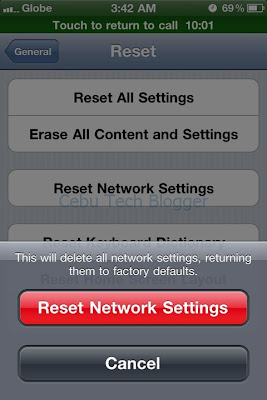
So how did I fix it? Well, it’s actually just a few taps in the phone which involve resetting network settings. If you’re into similar problem, you can follow the steps below.


From your iPhone springboard, launch Settings.


Tap General, scroll-down and look for Reset options.

Tap Reset Network Settings to restore factory defaults.


Wait until your iPhone reboot.

Once done, go check out your Network settings (Settings>General>Network) and there the Personal Hotspot feature is already restored.


To receive latest technology updates, you can subscribe either by E-mail or by RSS Feeds. Follow me also on Twitter.

Selasa, 30 Agustus 2011

Create and Open PDF Files in iPhone, iPad, and iPod Touch with Adobe CreatePDF

Adobe just released a new application that will allow users to view, create, manipulate, and manage Portable Document Format or PDF files right on their iOS devices.

Called Adobe CreatePDF, this business app is said to bring the same high-quality PDF creation with the cross-platform Adobe Acrobat or the cloud-based app of the same name. Adobe also says the app offers consistent and high-fidelity PDF conversion independent of device or software. And with an intuitive interface for PDF conversion, it can convert email attachments or files stored in the cloud by opening them right on the app. The company added that CreatePDF uses Adobe’s online services to ensure there’s no compromise on quality or performance, and the service does not keep copy of the original PDF document.


Among the supported file formats of Adobe CreatePDF for iPhone and iPad include:

  • MS Word (docx, doc), Excel(xlsx, xls), PowerPoint (pptx, ppt)

  • Adobe Illustrator (ai), Photoshop (psd) and InDesign (indd)

  • Images – JPEG, BMP, PNG, GIF, TIFF

  • RTF, Text and WordPerfect

  • OpenOffice and StarOffice documents

Adobe CreatePDF is now available at the App Store for $9.99; although the app is basically designed for iPhone and iPad, it will also work for iPod Touch running iOS 4.3 or later. Download link follows below.


Download Adobe CreatePDF for iPhone, iPad, and iPod Touch


To receive latest technology updates, you can subscribe either by E-mail or by RSS Feeds. Follow me also on Twitter.

Selasa, 23 Agustus 2011

Repair Shops in Cebu for iPhone, iPod Touch, and iPad?

Even during the advent of the first iPhone, Cebu is already one among the key cities in the Philippines with decent number of Apple users.


In fact, I’m not surprised when I see people still using earlier generation of iDevices. An Apple gadget is undeniably great! The problem though is when these devices got into trouble and you realized something in the hardware might have messed, and that you need an experienced technician to dig inside. Unlike with any other electronics and gadgets, availability of experienced repair technicians for iDevices is rare. And this could be a dilemma if you’re looking for one like what a fellow Cebuano is concerned about.

Philip, just another Cebu-techie, once stumbled on this blog and asked for a recommendation of repair shops specializing iDevices. I asked his permission to publish his query which reads:

Hello, Sir


Do you know of any trustworthy shops in Cebu that repair iPod Touches? You're a tech-blogger, and I noticed a few articles about iPhone-related stuff like unlocks and apps, etc. so I'm hoping that you'd know of at least one shop that specialize in iDevice repairs.


My iPod Touch is over a year old, and I never had any serious problems with it until a little over a week ago. It's jailbroken because of the customization capabilities; while it did randomly crash on me because of buggy Cydia tweaks (or conflicts), it never reached a point where it would no longer boot up. I've had my fair share of iPod Touch crashes (boot loops, stuck on the boot logo, springboard crashes, etc.) and I've always been able to fix them by myself. This time, it no longer responds to anything I do with it (believe me, I've tried), which is why I've concluded that it's a hardware-related issue.


It just refuses to turn on now. Even if I plugged it in to its charger, it doesn't charge-up anymore (in comparison, when my iPod Touch wouldn't turn on before, when I plugged it in, I could tell it was charging itself because the backside of my iPod would heat up a bit. A couple hours later, it's back to normal). Now it's just completely cold, no matter how long I leave it plugged in.


I've described my problem online, and someone told me it sounds like a faulty logic board. I'm familiar with iDevice software problems/fixes, but I have no experience with the actual hardware. Someone also said the battery probably got fried and will need replacement, but I haven't been able to find anyone who fixes iDevices (also haven't found a shop that carries legit iDevice spare parts like replacement batteries). So far, I've only found shops that help fix software-related issues (the kind of stuff I can fix myself); most aren't willing to even just open up the iPod Touch and examine the innards to give the problem a proper diagnosis.


If you know of a place I can have my iPod Touch examined and/or repaired, I'd really appreciate it. It's a 3rd generation iPod Touch, by the way. I know it's kind of dated, but I'm the type who hates throwing out "bigger" gadgets. If there's still hope to fix it, I'd rather get it fixed than get a newer model...so long as the expenses for the repairs make sense.
Well, it looks like you really have a quite complicated problem with your iPod Touch. But since I’m not going to tackle how to fix your device (it could be another post), I’ll just response to your main question.


Unless I’m missing one, the answer is NO. Most repair shops here in Cebu are actually not affiliated by Apple. And those premium Apple resellers in the city don't accept hardware repairs. They just send the devices back to the vendors.


I know of shops in E-Mall which accept repairs of iPhone and iPod Touch devices, but for your own protection - I won't recommend them since I'm not really sure regarding their expertise. But if you're interested, I can refer you to a friend of mine who's known much locally, particularly in Istorya.net, as an expert in repairing iDevices. He's actually an Engineer, who happened also to be an officemate of mine.


But of course we can ask for our friends and readers here in CTB if they know of a repair shop here in Cebu that accepts iDevices. Just leave a comment below to list one or two.


To receive latest technology updates, you can subscribe either by E-mail or by RSS Feeds. Follow me also on Twitter.

Minggu, 21 Agustus 2011

iPhone Unlimited Internet Through Globe's All-New My Super Surf Plan

I just switched my iPhone data plan from Globe Telecom to another plan which now gives me unlimited web browsing.

When Globe started offering the iPhone 4 last year, I got mine through its My Fully Loaded Plan at 1799. That was a good plan for me since I use local voice calls and SMS most of the time, and the accompanying free 15 hours of mobile internet was also just enough. In fact, when Globe launched its All-New My Super Surf Plan before summer ends - I didn't bother myself changing the plan freebies 'coz I thought it got the perfect combination for me. Not until recently when I realized most of the people I regularly call are already using VoIP services like Skype and Viber. Aside from regular mobile browsing outside Wi-Fi hotspots, I use VoIP services more frequently these days and that definitely hurts my pocket. That's even worse when you really have no other choice to access the web in your laptop rather than tethering your iPhone's internet connection.


All I need this time is an unlimited internet surfing in my iPhone.


So last week, I called Globe's hotline and requested for a change of Plan. From the original My Fully Loaded Plan, I switched to its new My Super Surf Plan. With the same monthly service fee (MSF) of Php 1799 a month, I got now an unlimited mobile internet access worth Php 999, plus voice calls and SMS as consumables worth Php 800.


Now, what excites me or perhaps gets me curious is the difference of web surfing experience in iPhone between my previous data Plan in Globe (My Fully Loaded Plan) and this new offer (My Super Surf). Let's just see.


PS. This post is also intended to answer the question if it's possible to change iPhone data plan in Globe Telecom.


To receive latest technology updates, you can subscribe either by E-mail or by RSS Feeds. Follow me also on Twitter.

Minggu, 24 Juli 2011

Element Case Vapor 4 for iPhone

Most of iPhone 4 protection accessories I’ve seen so far are made of either rubber or plastic, but this one really caught my attention.

Called Vapor 4 iPhone Case, I guess this is one of the sexiest yet hardcore casings available in the market today. Made of aircraft grade aluminum for strong hold, Vapor 4 protects the sides of an iPhone just like what the usual Apple Bumper for iPhone 4 does. So if you accidentally drop your iPhone and impact on objects sideways, fret nothing.

You can still use other protection for the front and rear glass panels though, like ZAGG Invisible Shield and among others. When I held the iPhone with Vapor 4 installed, I didn’t notice any reception issue which is good for iPhone 4 which has a known problem in signal performance when hands covers the antennae.

Vapor 4 is being manufactured by an American company Element Case, and a quick browsing on its website reveals several features and here's what they can say about its product:

  • Despite its minimalist appearance, the Vapor is CNC machined from a solid block of aircraft grade aluminum. In other words, it's strong and light (19 grams)!

  • A CNC on/off button is designed into the case to complete the clean lines.

  • The finish of the Vapor case is anodized to create a hard protective coating in brilliant colors. Yes, black is a color. We love anodized black.

  • In true Element Case™ style, the graphics are laser engraved.

  • The inside of the Vapor case is lined with a very high tech shock absorbing material that reduces the G-forces of an impact.

Vapor 4 is priced $79.99 which is really quite more expensive compared to other cases, but I think it's just fair for its build. I got a tip it's available locally (iStore), but wasn't able to confirm its price. I'm wondering if anyone here rocking Vapor 4 for iPhone?


To receive latest technology updates, you can subscribe either by E-mail or by RSS Feeds. Follow me also on Twitter.

Kamis, 16 Juni 2011

Yahoo App Search and AppSpot Help You Discover Apps for iPhone and Android Devices

Head to Yahoo.com today and there you’ll see a new search feature that will allow you to discover new and relevant apps for iPhone and Android devices based on your search query.


That’s actually what I discovered today.


Thinking that such feature is really new, I did a few more searches about it and there I found out Yahoo! did introduced and integrated Yahoo App Search to its existing Search Services. Not only that. Yahoo! also launched a new app for iPhone and Android called Yahoo AppSpot. Yahoo! AppSpot is a free mobile app that is compatible with iPhone, iPod Touch, iPad, and Android devices.


Yahoo AppSpot for iPhone
Yahoo App Search works by looking up relevant iPhone and Android apps based on search query from over 425,000 applications in Apple App Store, as well from the 200,000 apps in Android Market. It displays both free and paid apps, full comprehensive description and screenshots, with corresponding prices as well as star rating from users. The result page of Yahoo! App Search also features trending applications (probably based on number of downloads) so you would see other apps that would be of your interest.


Yahoo! AppSpot for Android
Yahoo! AppSpot works the same way, just that the interface is optimized for mobile devices. Among the best features include:


Daily Personal Picks: Unlike 'Top Apps' lists that provide the same apps day after day, you'll get new, personalized app suggestions on a daily basis, so you're always introduced to the latest, most interesting, and relevant apps.


More Precise Results: Using Yahoo!'s sophisticated search technology, quickly zero-in on an app by showing matching app titles as well as related keywords as you type.


Related Apps: Discover similar apps within the "more apps you'll love" section to find related apps that best match your needs.


At-a-Glance Shopping: Review the price, overall star ratings, screenshots, and description all on one screen to avoid the endless scrolling.


Fast & Easy Downloads: Direct links to the specific app pages within the Apple App Store or Android Marketplace make downloading an app a snap.


You can try Yahoo App Search by visiting apps.search.yahoo.com, and you can download AppSpot for iPhone and AppSpot for Android via the links. Note that AppSpot for iPhone is not available in Philippine Store just yet, but it can be downloaded from U.S. Store. Being said that, you'll need an Apple ID that is valid for purchase in US iTunes Store.


To receive latest technology updates, you can subscribe either by E-mail or by RSS Feeds. Follow me also on Twitter.
Sabtu, 26 Maret 2011

Apple iOS 4.3.1 Released, Direct Download Links for iPhone, iPod Touch, and iPad

As expected, Apple just released iOS 4.3.1 as a minor update to fix bugs and vulnerabilities, as well as the battery life issue claimed on iOS 4.3 for iPhone 3GS, iPhone 4, iPod Touch 3G, iPod Touch 4G, iPad, and iPad 2.

The update can be downloaded by connecting your iDevices and launching the latest version of iTunes installed in your machine. Note that Verizon iPhone 4 users are not included on this update, which means you’ll remain stuck on iOS 4.2.6 just yet. If you want to download iOS 4.3.1 directly from Apple server for later use, just hit on the links below:


iPhone

iOS 4.3.1 for iPhone 3GS: iPhone2,1_4.3.1_8G4_Restore.ipsw

iOS 4.3.1 for iPhone 4 (GSM Version): iPhone3,1_4.3.1_8G4_Restore.ipsw


iPod Touch

iOS 4.3.1 for iPod Touch 3G: iPod3,1_4.3.1_8G4_Restore.ipsw

iOS 4.3.1 for iPod Touch 4G: iPod4,1_4.3.1_8G4_Restore.ipsw


iPad

iOS 4.3.1 for iPad: iPad1,1_4.3.1_8G4_Restore.ipsw

iOS 4.3.1 for iPad 2 WiFi: iPad2,1_4.3.1_8G4_Restore.ipsw

iOS 4.3.1 for iPad 2 GSM: iPad2,2_4.3.1_8G4_Restore.ipsw

iOS 4.3.1 for iPad 2 CDMA: iPad2,3_4.3.1_8G4_Restore.ipsw


To receive latest technology updates, you can subscribe either by E-mail or by RSS Feeds. Follow me also on Twitter.

Kamis, 10 Maret 2011

Apple iOS 4.3 Released, Direct Download Links for iPhone, iPod Touch, iPad, and Apple TV

We’re expecting Apple to release iOS 4.3 tomorrow, but wait no more. The official and final build of the operating system for iPhone, iPod Touch, iPad, as well as Apple TV is now available for download.

Highlights of iOS 4.3 include:

  • Personal Hotspot which allows users to share data connection on iPhone 4

  • iTunes Home Sharing which lets you play multimedia files from a shared iTunes library both in Mac or PC

  • Faster Performance of the Safari browser

  • Ping, New AirPlay Features, New Settings, and some bug fixes on previous version.

Note that with iOS 4.3, iPod Touch 2G and iPhone 3G are no longer supported. And for you to download specific firmware files for your device, you’ll need to update iTunes to 10.2.1. Or you may check iOS 4.3 download links directly from the Apple server as listed below.


iPhone

iOS 4.3 for iPhone 3GS: iPhone2,1_4.3_8F190_Restore.ipsw

iOS 4.3 for iPhone 4 (GSM Version): iPhone3,1_4.3_8F190_Restore.ipsw


iPod Touch

iOS 4.3 for iPod Touch 3G: iPod3,1_4.3_8F190_Restore.ipsw

iOS 4.3 for iPod Touch 4G: iPod4,1_4.3_8F190_Restore.ipsw


iPad

iOS 4.3 for iPad (First-gen): iPad1,1_4.3_8F190_Restore.ipsw


Apple TV

iOS 4.3 for Apple TV: AppleTV2,1_4.3_8F191m_Restore.ipsw


So, that’s it. Of course, don't forget to leave a comment below just in case you encounter problem with the links. Good luck!


To receive latest technology updates, you can subscribe either by E-mail or by RSS Feeds. Follow me also on Twitter.

Selasa, 08 Maret 2011

Google Instant Previews Now Available on Android and iOS Devices

Following the desktop version of Google Instant Previews, the search giant made the new search feature available today for mobile devices running Android 2.2 and iOS 4.0 or later across 38 selected languages.


The functionality of the mobile version is almost the same as the desktop version, except on how the thumbnails are being presented to users. Here’s how Google Instant Previews looks like in an iPhone 4 running on iOS 4.2.1.


Google Search Result


Google Instant Previews on Mobile
The next time you search on Google using your Android or iOS-powered device, you will notice a small magnifying glass next to the search results. Just tap on it, and there you will see the Instant Previews. And if you don’t mind me saying, it’s actually cool! Go try it! J


To receive latest technology updates, you can subscribe either by E-mail or by RSS Feeds. Follow me also on Twitter.

Apple iOS 4.3 Won’t Support iPod Touch 2G and iPhone 3G

Apple updated iTunes recently with version 10.2, bringing support for iOS 4.3 and some improvements on features like Home Sharing which allows iPhone, iPad, and iPod Touch users to stream and transfer multimedia files in a local network.

While iOS 4.3 is set to be released comes March 11th, the day iPad 2 will launch in the US; the latest version of the firmware won’t bring any love at least to devices earlier than the iPhone 3G and iPod Touch 2G. That means, iOS 4.3 will only support iDevices which include iPhone 3GS, the GSM-based iPhone 4, iPod Touch 3G, iPod Touch 4G, the first-gen iPad, and the iPad 2.


iOS 4.3 is also expected to bring enhancements to Airplay, a feature which allows iPad, iPod Touch, and iPhone users to play contents on Apple TV; a faster Safari browser; capability to customize iPad Side Switch either as screen rotation lock or for muting the volume; and of course – iOS 4.3 will bring the Personal Hotspot feature for iPhone 4 users.


To receive latest technology updates, you can subscribe either by E-mail or by RSS Feeds. Follow me also on Twitter.

Senin, 28 Februari 2011

iPhone 4 Baseband Unlock on 3.10.01 and 2.10.04 [Update]

It has been too long, really, since the very first iPhone 4 user had been stuck on baseband 2.10.04 which is until now still can’t be unlocked using the latest version of Ultrasn0w.


Those who got their iPhone 4 pre-installed with iOS 4.2 or iOS 4.2.1 or those who accidentally upgraded the firmware to the said version without using the TinyUmbrella tool or without upgrading to a custom firmware, are also facing the same problem since iOS 4.2.1 come with baseband 3.10.01 which is also not unlockable just yet.


Given the long wait for the unlock of the said iPhone 4 basebands to be released, some users are desperately claiming the iPhone Dev Team actually has never found any exploit on baseband 3.10.01 or 2.10.04. However, it seems like baseband hacker @sherif_hashim has something good news for you. And believe me, he could be your knight in the shining armor.


A Twitter follower of @sherif_hashim asked him if he has found an exploit for baseband 3.10.01, but it looks like there’s something more than what had been asked. Sherif responded implicating that he found an exploit that will work both for basebands 3.10.01 and 2.10.04. Though there’s no ETA mentioned, a wilder analysis reveals it would be after a week or two when Apple released iOS 4.3, probably this March. Could it be part of the March 2 event? We don’t know yet. But of course, we won’t let the story pass without bringing it to you. Take a deep breath, and optimistically think the iPhone Dev Team has the new Ultrasn0w unlock already on queue. We'll let you know for more updates, so just stay tuned!


To receive latest technology updates, you can subscribe either by E-mail or by RSS Feeds. Follow me also on Twitter.
Senin, 21 Februari 2011

Does iPhone Internet Tethering Works for Bloggers?

How are you friends and loyal CTB readers? If you’ll ask me the same, well – I’m fine and everything is going well. Except for one factor that should always be in the world of blogging – the Internet.


This week, I’m scheduled to move to another apartment which is just a walking-distance to the company where I’m working. And that means I’ll be transferring my broadband internet connection again, for the third time, to another location. I’m using Smartbro Fixed Wireless Canopy in the apartment by the way ‘coz it’s the best option for me, and I’m satisfied with it so far. For about 4 weeks already, it’s temporarily down. What I’ve been using in the past couple of weeks is another broadband connection from Globe Telecom installed at home. Unfortunately, starting last weekend – seems like there was an outage on Globe’s network or probably just minor technical problem on our connection. Field technicians are scheduled for an on-site visit yesterday, but until now they still didn’t show up. Interesting! That’s actually the reason why I didn’t post any Tech updates on this blog on the past few days. Limited internet access...


While I’d better enjoy using a prepaid broadband stick either Globe Tattoo or the Smartbro Plug-It as an alternative – I chose tethering with my iPhone instead. At least I can also test how long I can use the iPhone in surfing the web and at the same time blogging. Based on experience, more than an hour of iPhone internet tethering seems like to cause an explosion due to too much heat; but I’m just really curious how long the device can stand in a continuous use. In this way also, I would be able to justify how reliable iPhone internet tethering for bloggers. J 


Are you a blogger? What do you think, will it work?


To receive latest technology updates, you can subscribe either by E-mail or by RSS Feeds. Follow me also on Twitter.
Selasa, 15 Februari 2011

PwnageTool 4.2 for Mac Released, Jailbreak iPhone 4/ 3G / 3GS/ Verizon, iPod Touch 3G / 4G, iPad, and AppleTV 2G on iOS 4.2.1 Untethered

Following the release of the latest version of Greenpois0n for Mac and Windows which can jailbreak iPhone 3GS and iPhone 4 untethered on iOS 4.2.1 as well as iPhone 3G, iPod Touch 3G, iPod Touch 4G, iPad, and AppleTV 2G- the iPhone Dev Team had just released earlier today the latest version of its tool called PwnageTool 4.2.

Pwnage Tool 4.2 is a jailbreak tool that will allow users to create a custom iOS 4.2.1 firmware and at the same time, retain the current unlockable baseband of the iPhone. That is, users only have to restore to that pre-jailbroken custom iOS 4.2.1 firmware, yet getting the same untethered jailbreak with preserved unlockable baseband. Supported devices running iOS 4.2.1 include:


iPhone 3G

iPhone 3GS

iPhone 4

iPhone 4-Verizon

iPod Touch 3G

iPod Touch 4G

iPad

AppleTV 2G


The Dev Team says they released PwnageTool 4.2 since Apple has already patched the exploit in the latest iOS 4.3 betas, and the move really makes sense. PwnageTool is dedicated only for Mac users; however, its Windows-equivalent, the Sn0wbreeze 2.2, is also under way. For the meantime, go check out the download link below after the break. [via]


PwnageTool_4.2.dmg --> PwnageTool_4.2.dmg.6176918.TPB.torrent

SHA1 Sum = af365f5de19d7ee19cbe1c67b2f226996a46b3ac


To receive latest technology updates, you can subscribe either by E-mail or by RSS Feeds. Follow me also on Twitter.
Sn0wbreeze 2.2 Coming Soon…Upgrade iPhone 4, 3GS, and 3G to Custom iOS 4.2.1 Firmware with Unlockable Baseband

iPhone users and jailbreakers, I got exciting news for you here!

Images of the new interface of Sn0wbreeze started to show up in the web and it highlights new feature that will allow iPhone 4, iPhone 3GS, and iPhone 3G users to upgrade to custom iOS 4.2.1 firmware, yet still preserving the unlockable baseband using Ultrasn0w. The new version is called Sn0wbreeze 2.2 Version 2.2r1. Basically, it’s being developed since the current version, Sn0wbreeze 2.1, won’t suffice and is limited only to creating a custom iOS 4.1 firmware.


For the sake of those who are new to Sn0wbreeze, it’s a tool designed for Windows users (Mac version is called PwnageTool) which will enable iPhone users to create a custom iOS firmware that is already jailbroken untethered, and also preserve the unlockable baseband of your device. In layman’s term, the Sn0wbreeze 2.2 will take in charge of the quite complicated process of jailbreaking iOS 4.2.1 on iPhone 4 or 3GS using Greenpois0n or Redsn0w and then unlocking its baseband using Ultrasn0w. Everything is already packed on what is said to be a custom iOS firmware, in which you can then use for your iPhone.


Update: Sn0wbreeze 2.2 is Out, Jailbreak iOS 4.2.1 Untethered on iPhone, iPod Touch, and iPad


Though there’s no ETA indicated, I have a strong feeling that developer @iH8sn0w will release the tool anytime soon. For the meantime, check out the photos after the break (for your viewing pleasure!) and don’t forget to subscribe for the latest updates.


Sn0wbreeze 2.2 UI


Modes as seen on Sn0wbreeze 2.2 UI


Other notable features on Sn0wbreeze 2.2
To receive latest technology updates, you can subscribe either by E-mail or by RSS Feeds. Follow me also on Twitter.

Senin, 14 Februari 2011

iPhone Nano / Mini: Smaller and Cheaper iPhone in the Works?

With the strong competition in the mid-range smartphone markets, many would think what the Cupertino-based company, Apple Inc. – is going to introduce this year to fill the gaps left by its high-end yet quite expensive latest iPhone models, particularly the GSM-based and the CDMA-based iPhone 4 devices.


iPhone Nano / Mini (Mock-up)
Reports started popping in which Apple is said to be working on a smaller version of its existing iPhone models. Cult of Mac is saying to have an exclusive source about this intriguing model of the iPhone (codenamed N97), claiming the device to lose “some” of its memory, thus enabling Apple to build a bite-sized version (just about half the size of the latest model) and eventually allowing the company to sell it almost half the price of main iPhones.

By “some” of the memory, we mean ALL of the memory. The iPhone nano will have no memory for onboard storage of media, our source says. It will have only enough memory to buffer media streamed from the cloud.

“I’m talking strictly storage memory here,” said our source.
Though there should be a little on-board memory for the OS and system caching, the iPhone Mini / Nano is rumored to have a little or to absolutely no internal storage and will just rely on cloud-based contents, that is the apps would presumably be distributed similar to SaaS.

The iPhone nano will pull ALL its content from MobileMe. When users buy a movie or TV show on iTunes, it’s available to stream to their iPhone or iPad. The service is based on technology from LaLa.com, a streaming service that Apple bought last spring and then shut down.

“It would be a mostly cloud-based iOS,” said our source.
The said iPhone Mini / Nano will sport an edge-to-edge screen (I think it’s safer to guess we won’t be seeing Home button here), virtual keyboard, and voice-based navigation – and is initially intended for release this summer.


We’ll be looking closely in the development of this story so just stay tuned for more updates. [via]


To receive latest technology updates, you can subscribe either by E-mail or by RSS Feeds. Follow me also on Twitter.

Selasa, 08 Februari 2011

iPhone Confession App Approved by Roman Catholic Church, Will it Work?

Following Pope Benedict XVI’s message for the 45th World Communications Day in which he invited young people to make good use of their presence in the digital world, a new application for iPhone, iPod Touch, and iPad devices has been released and approved by The Catholic Church.


The app called Confession: A Roman Catholic App is designed as a “perfect aid for every penitent”. At a price tag of $1.99 per download at the Apple App Store, Confession brings a personalized examination of conscience for each user and a step-by-step guide to the sacrament. With support for password-protected accounts, the app has been developed by Little iApps, LLC (a new start-up company) and has been collaborated by notable personalities in the US Catholic circle. The first app to receive an imprimatur from a Bishop, Confession would invite Catholics to prayerfully prepare for and participate in the Rite of Penance.


Though this is seemingly a good idea for the faithful, criticisms are always there to point out whether this would really work. But so far, for being a “new media at the service of the Word” – the Confession app is said to already aid one man in returning to the sacrament after 20 years. Match with the Daily Gospel App, I guess that would seem to work better. What do you think? [via]


To receive latest technology updates, you can subscribe either by E-mail or by RSS Feeds. Follow me also on Twitter.