Tampilkan postingan dengan label iOS. Tampilkan semua postingan

Senin, 25 Juli 2011

iOS 4.3.5, iOS 4.2.10 Released [Apple Direct Download Links]

So you thought iOS 5 is the next update to Apple’s latest iPhone firmware iOS 4.3.4 and iOS 4.2.9? Well, you got yourself wrong.

Apple surprisingly released another minor update to iOS 4.3; the latest firmware version is now iOS 4.3.5, and it's still unclear if this would be the last update before releasing iOS 5. iOS 4.3.5 is available for: iOS 3.0 through 4.3.4 for iPhone 3GS and iPhone 4 (GSM), iOS 3.1 through 4.3.4 for iPod Touch 3G and 4G, iOS 3.2 through 4.3.4 for iPad 1 and iPad 2.


Technical details of the update states:

An attacker with a privileged network position may capture or modify data in sessions protected by SSL/TLS
You may read more of the details of this update at Apple Support website.


Likewise, firmware for CDMA-based iPhone 4 has also been updated to iOS 4.2.10 which addresses the same security issue. You can learn more about the update here.


iOS 4.3.5 and iOS 4.2.10 are available for download via iTunes. Just plug in your device to your computer, locate it in iTunes sidebar, and click to check for updates. iOS 4.3.5 comes in as Build 8L1, while iOS 4.2.10 as Build 8E600.


Note that those who wanted to keep their untethered jailbreak in iOS 4.3.3 or iOS 4.2.8 must stay away from downloading iOS 4.3.5 and iOS 4.2.10, or else you will lose your untethered jailbreak. Just stay tuned for updates when it’s already safe to update as far as untethered jailbreaking is concerned.


For those who want to download iOS 4.3.5 and iOS 4.2.10 directly from Apple servers for later upgrade, you may refer to the links below. Just select the right firmware for your device.


iPhone 3GS: iPhone2,1_4.3.5_8L1_Restore.ipsw

iPhone 4 (GSM): iPhone3,1_4.3.5_8L1_Restore.ipsw

iPod Touch 3G: iPod3,1_4.3.5_8L1_Restore.ipsw

iPod Touch 4G: iPod4,1_4.3.5_8L1_Restore.ipsw

iPad 1: iPad1,1_4.3.5_8L1_Restore.ipsw

iPad 2 (Wi-Fi): iPad2,1_4.3.5_8L1_Restore.ipsw

iPad 2 (GSM): iPad2,2_4.3.5_8L1_Restore.ipsw

iPad 2 (CDMA): iPad2,3_4.3.5_8L1_Restore.ipsw

iPhone 4 (CDMA) : iPhone3,3_4.2.10_8E600_Restore.ipsw


To receive latest technology updates, you can subscribe either by E-mail or by RSS Feeds. Follow me also on Twitter.

Jumat, 15 Juli 2011

iOS 4.3.4, iOS 4.2.9 Released [Apple Direct Download Links]

As expected, Apple has released iOS 4.3.4 which addresses PDF vulnerability in the firmware.

iOS 4.3.4 is available for download via iTunes for devices including GSM-based iPhone 4, iPhone 3GS, iPod Touch 4G, iPod Touch 3G, iPad 1, and iPad 2 (Wi-Fi Only, GSM, CDMA). Apple also released an updated version of the firmware, iOS 4.2.9, for CDMA-based iPhone 4.


The iOS 4.3.4 update comes in as Build 8K2, while the iOS 4.2.9 rolls with Build 8E501.


Basically, iOS 4.3.4 and iOS 4.2.9 fix security vulnerability associated with viewing malicious PDF files. However, both of these also patch the exploit used in the latest web-based jailbreaking tool - JailbreakMe 3.0. More of the technical details of this update here and here.


To jailbreakers, note that when you upgrade your device’s firmware to iOS 4.3.4 or iOS 4.2.9, you’ll lose your untethered jailbreak on iOS 4.3.3. If you want to keep your untethered jailbreak on iOS 4.3.3, you need to install PDF Patcher 2 which basically gives you the same effect of iOS 4.3.4 and iOS 4.2.9.


Apple official direct download links of iOS 4.3.4 and iOS 4.2.9 are posted below. You may need to download any of these firmwares compatible with your device for later upgrade.


iPhone 3GS: iPhone2,1_4.3.4_8K2_Restore.ipsw

iPhone 4 (GSM): iPhone3,1_4.3.4_8K2_Restore.ipsw

iPod Touch 3G: iPod3,1_4.3.4_8K2_Restore.ipsw

iPod Touch 4G: iPod4,1_4.3.4_8K2_Restore.ipsw

iPad 1: iPad1,1_4.3.4_8K2_Restore.ipsw

iPad 2 (Wi-Fi): iPad2,1_4.3.4_8K2_Restore.ipsw

iPad 2 (GSM): iPad2,2_4.3.4_8K2_Restore.ipsw

iPad 2 (CDMA): iPad2,3_4.3.4_8K2_Restore.ipsw

iPhone 4 (CDMA) : iPhone3,3_4.2.9_8E501_Restore.ipsw


To receive latest technology updates, you can subscribe either by E-mail or by RSS Feeds. Follow me also on Twitter.

Selasa, 07 Juni 2011

iOS 5 Jailbreak Works in no time!

You read it right. iOS 5 beta release has already been jailbroken, well; at least on iPod Touch 4G.


Want some evidence? Below are screenshots courtesy of iPhone hacker, MuscleNerd.

As you can see on the first image, it’s the iOS 5 springboard with the new Reminders and Newstand apps, and of course the icons of Cydia Store and iSSH utility app that you’ll only see on a jailbroken iPhone firmware.

Just in case you’re wondering what tool MuscleNerd used to jailbreak iOS 5 on his iPod Touch – it’s Geohot’s Limera1n.


Here’s the catch though, the jailbreak is still tethered. But I’m thinking the great iPhone Dev Team and the Chronic Dev Team as well, are already working on the untethered jailbreak at least on the beta version of the latest firmware. Apple is set to release the final build of iOS 5 come fall, and let’s just see how the cat-and-mouse game between Apple and the Dev Team goes once the firmware becomes available. [via]


To receive latest technology updates, you can subscribe either by E-mail or by RSS Feeds. Follow me also on Twitter.

Apple Announces iOS 5, Check New Features for your iPhone, iPod Touch, and iPad

Not much of a surprise, but Apple already announced earlier today the upcoming release of the latest version of its mobile operating system.


iOS 5 is set to be available for download come fall or some time in September this year. iOS 5 is promised to be compatible with iPhone 3GS, iPhone 4, iPod Touch 3G, iPod Touch 4G, the first-gen iPad, and iPad 2.

iOS 5 is packed with new functionalities and cool features which enhance the overall user experience on previous version of the firmware running on iDevices. Below are the top highlights from among 200 features available in iOS 5.


Notification Center: Most of the day we receive lots of notifications from text messages, new emails, schedules, and etc. The Notification Center simply shows an animated notification on top of your screen and then hides automatically without interrupting the current applications running on your device. Simply slide from top of the screen, and there you’ll see your missed calls, reminders, schedules, and other stuff that need your attention displayed on the screen.

Notifications also appear on the lock screen, with the ability to be taken to the notifying app with just one swipe. Simply swipe on the message and it will load right into the apps that sent the notification. That’s actually the same feature as seen on BiteSMS. Am I right, jailbreakers?

Newsstand: Organize your subscriptions on magazines, newspapers, and e-readers in one place and then update automatically allowing you to have the latest issue complete with new cover.

Reminders App: allows you to organize and manage task and to-do list which also syncs with iCal and Outlook. Added features include the location based reminders that is activated when you arrived on the destination or leave somewhere either from your office or at home.

Twitter Integration: Twitter applications are now fully integrated on iOS 5. You just simple sign-in to Twitter at once on your device and all apps requiring Twitter credentials will just utilize the details you’ve entered from your first login. In this way, tweeting photos and videos directly from galleries, or just anything about “tweeting” has been made even easier.

Optimized Safari Web Browsing: Safari, if I’m not mistaken, has been the most fully-featured web browser integrated on mobile devices. With iOS 5 devices, Safari seems to offer a better browsing experience with its new features: the Safari Reader, Reading List, and Tabbed Browsing. Safari Reader gets all the clutter out of the way and sets the right font size on a web page, so users can navigate and read contents easily. Reading List on the other hand works as if you’re flagging stars on articles saving it for later reading. iPad users will also get to enjoy the new feature of Safari called Tabbed Browsing, which makes it easy to flip between multiple web pages.

Enhanced Camera App: Immediately capture the moment right from your iOS device. Camera App can now be accessed easily right on your Lock Screen and then use the volume button to snap and take picture. Use grid lines, pinch-to-zoom gestures, and single-tap focus for good composition of your photos. Edit your photo as well directly from your iPhone or iPad with its photo enhancing features that allows you to crop, red-eye reduction, or simply auto-enhance the images.

iMessage: Texting had been the most effective way of communication on mobile device. iMessage provides easy way to not just text messages but also share photos and videos exclusively to all iOS devices via Wi-Fi or 3G connections. Ellipsis points appear when someone’s responding on your message. With the iCloud service from apple, you can start a conversation with any of your iOS device like iPad and then reply on your iPhone. Sort of communication on the go.

Game Center: Game Center first became available in iOS 4. It’s an arena for gamers to find friends, or go up against each other even from anywhere around the world. In iOS 5, it brings Game Center with the ability to add photos to your profile, purchase new games from within the Game Center app and expand your social gaming network easier.

iCloud Sync: Using Dropbox? Think iCloud as the similar, or let me say, a better cloud-based service from Apple. In iOS 5, you can sync contents in your iOS device to iCloud just by entering your Apple ID and password. Keep all of your mail, contacts, calendars, photos, apps, books, music and more, up-to-date across all your devices without ever having to connect to a computer – that is wirelessly! Do we have to say goodbye to iTunes? No, not really.


Multitasking Gestures and Airplay Mirroring for iPad: iOS 5 includes new moves and shortcuts to help you get around even quicker with your iPad. Using four or five fingers, swipe up to review the multitasking bar, pinch to return to the home screen, or swipe left and right to switch between active applications.

Airplay Mirroring on the other hand allows you to stream your photos or videos wirelessly on your HDTV via Apple TV. Though just available for iPad 2, this feature lets everyone sees exactly what’s on your iPad display – even when you rotate the tablet’s position from portrait to landscape or zoom in and out on photos.


That’s it! Again, Apple will bring around 200 new features in iOS 5, so I guess it’s something we shouldn’t have to miss. I’m personally excited running it on my iPhone 4, but I understand we gotta wait ‘till fall before the update become available. Stay tuned!


To receive latest technology updates, you can subscribe either by E-mail or by RSS Feeds. Follow me also on Twitter.

Senin, 06 Juni 2011

Look, this is What They Call Magical iOS 5!

Apple's latest mobile operating system, iOS 5, is set to be unveiled later today at the WWDC 2011.


But as early as now, one entertainer in the name of Simon Pierro, got something for us to preview the latest firmware and witness its magical features as seen on the iPad. I’ve already seen the video and before you see it - I warn you that you had never ever seen such features on other operating systems or even on previous versions of iOS. This is going to be pretty exciting, and if you’re ready – go hit the video after the break.


It’s magical indeed. Just that it would never come to reality. Anyway, the real iOS 5 is coming in the next few hours after I publish this post. So just stay tuned for more updates. J


To receive latest technology updates, you can subscribe either by E-mail or by RSS Feeds. Follow me also on Twitter.

Rabu, 04 Mei 2011

iOS 4.3.3 IPSW Direct Download Links

Earlier today Apple released iOS 4.3.3 for GSM and CDMA-based iPhone 4, iPhone 3GS, iPad 2, iPad 1, iPod Touch 4G, and iPod Touch 3G.


Firmware update for each iOS device is available for download via iTunes, but for those who prefer downloading the firmware directly from Apple server for later upgrade, you can refer to the links below.


iPad 1 : iPad1,1_4.3.3_8J3_Restore.ipsw

iPad 2 (Wi-Fi Only): iPad2,1_4.3.3_8J2_Restore.ipsw

iPad 2 (Wi-Fi + 3G): iPad2,2_4.3.3_8J2_Restore.ipsw

iPad 2 (CDMA): iPad2,2_4.3.3_8J2_Restore.ipsw

iPhone 3GS : iPhone2,1_4.3.3_8J2_Restore.ipsw

iPhone 4 (GSM): iPhone3,1_4.3.3_8J2_Restore.ipsw

iPhone 4 (CDMA): iPhone3,3_4.2.8_8E401_Restore.ipsw

iPod Touch 4G: iPod4,1_4.3.3_8J2_Restore.ipsw

iPod Touch 3G: iPod3,1_4.3.3_8J2_Restore.ipsw


Update: July 6, 2007

Jailbreak tutorials for iOS 4.3.3 have already been published. See links below.

How to Jailbreak iOS 4.3.3 on iPad 1 and iPad 2 Using JailbreakMe 3.0

How to Jailbreak iOS 4.3.3 on iPhone 3GS and iPhone 4 Using JailbreakMe 3.0

How to Jailbreak iOS 4.3.3 on iPod Touch 3G and 4G Using JailbreakMe 3.0


To receive latest technology updates, you can subscribe either by E-mail or by RSS Feeds. Follow me also on Twitter.

Apple Releases iOS 4.3.3 for iPhone, iPad, and iPod Touch

Apple released today another firmware update which addresses location tracking bug discovered recently in iOS devices including GSM-based iPhone 4, iPhone 3GS, iPad 2, iPad, and iPod Touch 4G and 3G.

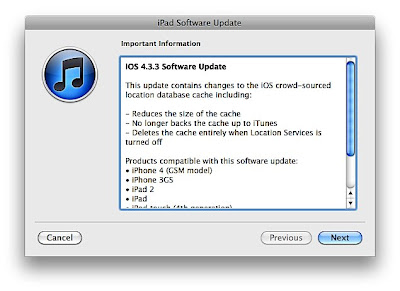
Apple says iOS 4.3.3 contains changes to the iOS crowd-sourced location database cache. The changes include:

  • Reduces the size of the cache

  • No longer backs the cache up to iTunes

  • Deletes the cache entirely when Location Services is turned off

Verizon iPhone 4 users in the US will get similar update with iOS 4.2.8 via iTunes.


To receive latest technology updates, you can subscribe either by E-mail or by RSS Feeds. Follow me also on Twitter.

Sabtu, 26 Maret 2011

Apple iOS 4.3.1 Released, Direct Download Links for iPhone, iPod Touch, and iPad

As expected, Apple just released iOS 4.3.1 as a minor update to fix bugs and vulnerabilities, as well as the battery life issue claimed on iOS 4.3 for iPhone 3GS, iPhone 4, iPod Touch 3G, iPod Touch 4G, iPad, and iPad 2.

The update can be downloaded by connecting your iDevices and launching the latest version of iTunes installed in your machine. Note that Verizon iPhone 4 users are not included on this update, which means you’ll remain stuck on iOS 4.2.6 just yet. If you want to download iOS 4.3.1 directly from Apple server for later use, just hit on the links below:


iPhone

iOS 4.3.1 for iPhone 3GS: iPhone2,1_4.3.1_8G4_Restore.ipsw

iOS 4.3.1 for iPhone 4 (GSM Version): iPhone3,1_4.3.1_8G4_Restore.ipsw


iPod Touch

iOS 4.3.1 for iPod Touch 3G: iPod3,1_4.3.1_8G4_Restore.ipsw

iOS 4.3.1 for iPod Touch 4G: iPod4,1_4.3.1_8G4_Restore.ipsw


iPad

iOS 4.3.1 for iPad: iPad1,1_4.3.1_8G4_Restore.ipsw

iOS 4.3.1 for iPad 2 WiFi: iPad2,1_4.3.1_8G4_Restore.ipsw

iOS 4.3.1 for iPad 2 GSM: iPad2,2_4.3.1_8G4_Restore.ipsw

iOS 4.3.1 for iPad 2 CDMA: iPad2,3_4.3.1_8G4_Restore.ipsw


To receive latest technology updates, you can subscribe either by E-mail or by RSS Feeds. Follow me also on Twitter.

Kamis, 10 Maret 2011

Apple iOS 4.3 Released, Direct Download Links for iPhone, iPod Touch, iPad, and Apple TV

We’re expecting Apple to release iOS 4.3 tomorrow, but wait no more. The official and final build of the operating system for iPhone, iPod Touch, iPad, as well as Apple TV is now available for download.

Highlights of iOS 4.3 include:

  • Personal Hotspot which allows users to share data connection on iPhone 4

  • iTunes Home Sharing which lets you play multimedia files from a shared iTunes library both in Mac or PC

  • Faster Performance of the Safari browser

  • Ping, New AirPlay Features, New Settings, and some bug fixes on previous version.

Note that with iOS 4.3, iPod Touch 2G and iPhone 3G are no longer supported. And for you to download specific firmware files for your device, you’ll need to update iTunes to 10.2.1. Or you may check iOS 4.3 download links directly from the Apple server as listed below.


iPhone

iOS 4.3 for iPhone 3GS: iPhone2,1_4.3_8F190_Restore.ipsw

iOS 4.3 for iPhone 4 (GSM Version): iPhone3,1_4.3_8F190_Restore.ipsw


iPod Touch

iOS 4.3 for iPod Touch 3G: iPod3,1_4.3_8F190_Restore.ipsw

iOS 4.3 for iPod Touch 4G: iPod4,1_4.3_8F190_Restore.ipsw


iPad

iOS 4.3 for iPad (First-gen): iPad1,1_4.3_8F190_Restore.ipsw


Apple TV

iOS 4.3 for Apple TV: AppleTV2,1_4.3_8F191m_Restore.ipsw


So, that’s it. Of course, don't forget to leave a comment below just in case you encounter problem with the links. Good luck!


To receive latest technology updates, you can subscribe either by E-mail or by RSS Feeds. Follow me also on Twitter.

Selasa, 08 Maret 2011

Google Instant Previews Now Available on Android and iOS Devices

Following the desktop version of Google Instant Previews, the search giant made the new search feature available today for mobile devices running Android 2.2 and iOS 4.0 or later across 38 selected languages.


The functionality of the mobile version is almost the same as the desktop version, except on how the thumbnails are being presented to users. Here’s how Google Instant Previews looks like in an iPhone 4 running on iOS 4.2.1.


Google Search Result


Google Instant Previews on Mobile
The next time you search on Google using your Android or iOS-powered device, you will notice a small magnifying glass next to the search results. Just tap on it, and there you will see the Instant Previews. And if you don’t mind me saying, it’s actually cool! Go try it! J


To receive latest technology updates, you can subscribe either by E-mail or by RSS Feeds. Follow me also on Twitter.

Apple iOS 4.3 Won’t Support iPod Touch 2G and iPhone 3G

Apple updated iTunes recently with version 10.2, bringing support for iOS 4.3 and some improvements on features like Home Sharing which allows iPhone, iPad, and iPod Touch users to stream and transfer multimedia files in a local network.

While iOS 4.3 is set to be released comes March 11th, the day iPad 2 will launch in the US; the latest version of the firmware won’t bring any love at least to devices earlier than the iPhone 3G and iPod Touch 2G. That means, iOS 4.3 will only support iDevices which include iPhone 3GS, the GSM-based iPhone 4, iPod Touch 3G, iPod Touch 4G, the first-gen iPad, and the iPad 2.


iOS 4.3 is also expected to bring enhancements to Airplay, a feature which allows iPad, iPod Touch, and iPhone users to play contents on Apple TV; a faster Safari browser; capability to customize iPad Side Switch either as screen rotation lock or for muting the volume; and of course – iOS 4.3 will bring the Personal Hotspot feature for iPhone 4 users.


To receive latest technology updates, you can subscribe either by E-mail or by RSS Feeds. Follow me also on Twitter.

Kamis, 13 Januari 2011

Apple to Release iOS 4.3 in March with Personal Hotspot for iPhone 4

Apple just released the beta version of iOS 4.3 to developers yesterday, and while there’s no word of its official release to the general public – the folks at Redmond Pie are reporting that the latest firmware for iPhone and iPad will be available sometime in March.


iOS 4.3 Build 8F5148b is said to bring the Personal Hotspot feature to GSM-based iPhone 4 devices. The Personal Hotspot is a feature which allows Wi-Fi tethering (utilizing cellular data) on the recently-announced CDMA-based iPhone 4 from Verizon Wireless in the US. Though Verizon’s iPhone 4 will be available by February 10th and will run on iOS 4.2.5, Apple won’t release a firmware update to existing iPhone 4 users to match with that of Verizon’s. Instead, they will be releasing iOS 4.3 (with Personal Hotspot) in March. So, that actually makes sense.


The Personal Hotspot on iOS 4.3 is confirmed to support iPhone 4 only. There’s no word if it will also support iPhone 3G and 3GS. But with the newly released iOS SDK 4.3 beta, it appears that only iPod Touch 3G, iPod Touch 4G, iPhone 3GS, iPhone 4, and the iPad are supported. There’s no software update for iPhone 3G and iPod Touch 2G, so I guess the Personal Hotspot feature will be supported only in iPhone 4 and iPhone 3GS.


Anyway, we’ll let you know more once we get official word from Apple, or perhaps more evidence and proof. [via]


To receive latest technology updates, you can subscribe either by E-mail or by RSS Feeds. Follow me also on Twitter.

Kamis, 02 Desember 2010

Smartphone OS War: Apple iPhone Beats RIM BlackBerry, iOS and Android are Most Desired OS

So which smartphone OS are you- iOS, Android, Windows Phone 7, BlackBerry OS, or Palm OS?

If you live in the US, perhaps you are one among those who are currently using Apple iDevices or BlackBerry devices, which are currently on the statistical dead heat.


Nielsen reports that in the US, 29.7% of the total mobile phone subscribers own smartphones that run in full operating systems. And with that smartphone OS share, RIM BlackBerry OS and Apple iOS are caught in a close competition. According to October 2010 data from The Nielsen Company, Apple iPhone OS or iOS has 27.9% of the total Smartphone OS Share while RIM BlackBerry OS has 27.4%. That’s 0.5% close difference in favor of the iOS.


Android OS is the third widely used Smartphone OS in the US with 22.7% share, followed by Microsoft Windows Mobile (14.0%) and Symbian OS (3.4%).

Nielsen also added that if mobile phone users who planned to upgrade to a smartphone device in the next year were asked about their next phone, the iOS and Android were tied for “most desired” operating system.


Interesting… That basically implicates a battle between iOS and Android in 2011 until 2014. These two smartphone OS’s will gear as the 2nd most widely used mobile OS worldwide, next to Symbian which still remains dominant. [via]


To receive latest technology updates, you can subscribe either by E-mail or by RSS Feeds. Follow me also on Twitter.