Tampilkan postingan dengan label Apps. Tampilkan semua postingan

Sabtu, 10 September 2011

Download Official Blogger App for iPhone, iPod Touch, and iPad


Wait no more, bloggers. If you’re using Google’s blogging platform, well, you should be happy to hear that the official Blogger app for iOS devices has already made its way to the App Store.


The new Blogger app which is compatible with iPhone, iPod Touch, and iPad running at least iOS 3.1.3, brings similar features as its Android counterpart including publishing of posts with photos, labels, and location information.


Blogger app will allow you to: Select account/blog if you have more than 1. Include pictures from the gallery or by taking a picture directly from the app Add labels Add location information Save as draft or immediately publish View list of saved/published posts

Though the UI is only available in English, the app supports blog posts written in all languages. The app doesn’t have some of the features available on the web-based version including video upload, stats, comment moderation, as well as formatting tools – but I’d guess Google will bring it all very soon. I can say though the app is still great after all. Go check it out here and do let us know what you think about it.


To receive latest technology updates, you can subscribe either by E-mail or by RSS Feeds. Follow me also on Twitter.

Selasa, 30 Agustus 2011

Samsung ChatOn is a Cross-Platform Messaging App That Only Get Me Excited to Try

So you think Samsung will just keep on releasing new phones and tablets in the future? Obviously, no!

In fact, the Korean phone maker has been very busy prepping up its new messaging service called ChatOn, set to debut next month at the IFA consumer electronics trade show in Berlin, Germany.


At first, you would think Samsung’s ChatOn as yet just another BBM-like chat service, but it’s probably not as far as the demo video below is concerned. ChatOn brings something new in group chat services available today such as multimedia sharing through its "Trunk" feature, sending animated messages, and there’s also what it calls "Interaction Rank" which shows contacts you send messages the most. Though quite impressive, it’s still unclear if this chat service will ever take off the likes of Facebook Messenger, the Huddle in Google+, WhatsApp, GroupMe, or even Apple’s upcoming iMessage service in iOS 5.


Samsung says ChatOn will be available in 120 countries and 62 languages; and will not only work on its proprietary Bada OS, but also in Android, BlackBerry OS, and iOS.


Take a look the intro video below and let’s see if you like it.


To receive latest technology updates, you can subscribe either by E-mail or by RSS Feeds. Follow me also on Twitter.

Create and Open PDF Files in iPhone, iPad, and iPod Touch with Adobe CreatePDF

Adobe just released a new application that will allow users to view, create, manipulate, and manage Portable Document Format or PDF files right on their iOS devices.

Called Adobe CreatePDF, this business app is said to bring the same high-quality PDF creation with the cross-platform Adobe Acrobat or the cloud-based app of the same name. Adobe also says the app offers consistent and high-fidelity PDF conversion independent of device or software. And with an intuitive interface for PDF conversion, it can convert email attachments or files stored in the cloud by opening them right on the app. The company added that CreatePDF uses Adobe’s online services to ensure there’s no compromise on quality or performance, and the service does not keep copy of the original PDF document.


Among the supported file formats of Adobe CreatePDF for iPhone and iPad include:

  • MS Word (docx, doc), Excel(xlsx, xls), PowerPoint (pptx, ppt)

  • Adobe Illustrator (ai), Photoshop (psd) and InDesign (indd)

  • Images – JPEG, BMP, PNG, GIF, TIFF

  • RTF, Text and WordPerfect

  • OpenOffice and StarOffice documents

Adobe CreatePDF is now available at the App Store for $9.99; although the app is basically designed for iPhone and iPad, it will also work for iPod Touch running iOS 4.3 or later. Download link follows below.


Download Adobe CreatePDF for iPhone, iPad, and iPod Touch


To receive latest technology updates, you can subscribe either by E-mail or by RSS Feeds. Follow me also on Twitter.

Kamis, 25 Agustus 2011

Free Anti-Virus for Android: Norton Mobile Security Lite


I can’t deny the fact that I’m personally a big fan of Norton security products.


From Norton Internet Security 2011 to a more clever and vigilant Norton 360 V5.0, I’m confident to say I got one of the best PC security solutions today. In fact, when I learned Symantec brought its Norton technologies to Android, I thought the app is going to be a must-try.


For those Android users out there who have been looking for a free anti-virus, or should I say a free anti-malware app to use in your device, Norton has something for you.


Norton has released Norton Mobile Security Lite, a free security application for Android device. The app seamlessly combines select anti-theft features with powerful anti-malware, giving users a sense of security in the event their phone is ever lost, stolen or compromised by malware.


Among the key features of Norton Mobile Security Lite includes:


  • Anti-theft – Remotely lock your lost or stolen device via SMS text and prevent strangers from seeing your private information or running up your mobile bill.

  • Anti-malware – Scans all files and app updates downloaded to the mobile device and automatically detects and removes threats without slowing you down.

  • Automatic LiveUpdate – Automatically downloads and installs security updates keeping you a step ahead of cybercriminals.


More of this security app through the video below:


Norton Mobile Security Lite is compatible with devices running at least Android 2.2 (Froyo). If you think you need this, just head over to the Android Market via this link.


Now I guess some iPhone users are gonna be jealous on this. No, I'm just kidding.J iPhone version, please...


To receive latest technology updates, you can subscribe either by E-mail or by RSS Feeds. Follow me also on Twitter.


Selasa, 09 Agustus 2011

Globe Telecom Also Offer Free Facebook Access on Java-Enabled Phones, Finally!

I’m not surprised. It’s quite obvious, folks.

You see… When Facebook announced its new Java App for Every Phone, Smart Communications and Globe Telecom were listed among those partner-carriers to offer its respective subscribers free data access to the social networking site. Smart confirmed the free service offer, while Globe Telecom said they don’t. Now that Smart subscribers are already taking advantage of this free Facebook access since last month, I thought it won’t make any sense for Globe if they don’t offer similar service. And I think I’m right, because by now up until October 31, 2011 – you should also be able to access Facebook for free through Globe’s network.


But before you get started, you’ll need to do few things.


First, send FB to 2910. You’ll receive an SMS from 2910 with a link to download the Facebook app (It’s actually at http://m/globe.com.ph/facebookapp). You’ll be asked to install the app in the succeeding steps.


You’re required to use MyGlobe Connect as your access point (APN Settings) when using the app, else standard rates may apply. If you have any concern, don't hesitate to leave a comment below.


To receive latest technology updates, you can subscribe either by E-mail or by RSS Feeds. Follow me also on Twitter.

Senin, 08 Agustus 2011

How to Install Mobile App for Java for Unlimited Access to Facebook [Smart Network]

I’m still receiving several queries on how to install the Java app that will allow unlimited access to the social networking site in Smart network.


I thought it would be great if I just post a tutorial for everyone’s reference.


As a primer for those who haven’t heard about this Java app, it’s actually called Facebook for Every Phone App that is only supported here in the Philippines by Smart. It’s an app that will allow Smart subscribers to access Facebook for free only until October 14, 2011. The app only works in over 2500 "dumb" phones, generally just those phones with support for mobile Java applications, yet doesn’t run a complete mobile OS. I’ve tested the app working seamlessly in mobile phones carrying Symbian platform particularly Series 40 and Series 60. At first, there’s no specific listing of supported devices though, making it hard to figure out which one really has a problem -- could it be the phone being unsupported, internet settings, or the app itself. Now at least we have it, so before you proceed with the tutorial below make sure your phone is listed here (Tip: Type Ctrl + F to search for your phone).


So we won't take this any longer. Here’s a tutorial that will install the app and configure supported devices. I thought this is the easiest one, so I suggest you follow the steps carefully to avoid possible errors.


How to Install Facebook for Every Phone App (I used Nokia 5250 here, folks.)


1. Using your Smart SIM, send FB to 211. Make sure you have extra load after sending. I suggest at least Php 10, though Smart requires you to have at least Php 1.


Click to enlarge
2. You will receive an SMS from 211, open it.


Click to enlarge
3. From text message, open the link http://fbapp.smart.com.ph to download Facebook Mobile App.


Click to enlarge
4. You’ll be prompted whether to download and install the file or not. Just select Continue.


Click to enlarge
Technically, it will download the JAD file (Java Application Descriptor) which packed the Facebook installer.


5. A security warning may prompt, just select Continue.


Click to enlarge
6. Select memory location where you want to install the app. I selected phone memory by default.


Add caption
7. It will continue downloading and install the app then. Once complete, you may select Start.


 8. But alternatively, you can also start the app by going to the Installed Apps directory of your phone. I chose this option. It’s usually located at: Menu > Applications > Installed Apps > Facebook


Click to enlarge
9. You will be prompted to allow application to use network. Just select Allow for this session to continue.


Click to enlarge
10. It will launch Facebook, test your connection, and you’ll be asked to login.


Click to enlarge
Note: Make sure you’ll see the text “Free from SMART” just below the Facebook logo. That will assure you won’t be charged a single cent for browsing.


11. During your first login, Facebook will ask you to find friends. I’m sure you won’t it at this point, so just select Skip at the lower-right portion of the interface.


Click to enlarge
12. You’ll be redirected to the homepage where you will see most of the popular features of Facebook like News Feed, Messages, Events, Calendar, Photos, Friends, Profile, Search, and among others.


Click to enlarge
13. You’re done! At first I was confused how I can logout. But later I was able to figure out by selecting Menu link just right in the homepage or News Feed.


Click to enlarge
Final Note: Your phone may have a pre-installed native Facebook app. I strongly suggest that you don’t use it since it’s not the app supported by Smart. You’ll be charged if you use that app. Facebook for Every Phone App is located in the Installed Apps directory (Menu > Applications > Installed Apps > Facebook), and you have to launch FB from there to avail of the free service.


Hope this helps.


To receive latest technology updates, you can subscribe either by E-mail or by RSS Feeds. Follow me also on Twitter.

Jumat, 22 Juli 2011

Download Free Angry Birds for iPhone, iPod Touch, and iPad

If you own any of Apple mobile devices like iPhone, iPod Touch, and iPad – and looking for puzzle games to play, presumably you have Angry Birds in mind.


Angry Birds is inarguably one of the best games for mobile handsets, in fact – the casual video games review site, Imagine Games Network or simply IGN, listed the game as the fourth best iPhone game of all time. For the records, Angry Birds had already reached 250 million downloads last month, that includes paid and free versions in all platforms.


In Apple App Store, Angry Birds is available both as free and paid app, in which each version has different sets of gameplay or levels, as well as the features. Definitely the paid versions come with the best package, but free versions are also good for trials until you decide of purchasing the paid ones.


I listed below all available Free Angry Birds for download in iPhone, iPod Touch, and iPad devices. The list will be updated as soon as new versions are posted in App Store. Just select the right app that will work in your device.


Angry Birds Lite, compatible with iPhone, iPod touch, and iPad running iOS 4.0 or later.

Angry Birds Lite is the first free version of the game released which was designed to cater early versions of iPhone and iPod Touch such as iPhone 3G, iPhone 3GS, and iPod Touch 3G. But of course this will also work in iPhone 4 and iPod Touch 4G, as well as iPad 1 and iPad 2. Angry Birds Lite features hours of gameplay, challenging physics-based castle demolition, and lots of replay value. Each of the 12 levels requires logic, skill, and brute force to crush the enemy. [Download Link]


Angry Birds Free, compatible with iPhone, iPod touch, and iPad running iOS 4.0 or later.

Angry Birds Free features challenging physics-based demolition gameplay and lots of replay value. The 15 levels, set in 5 mini episodes, have been created specifically for this version. Other features include Game Center support, with leaderboards and achievements in the UI. [Download Link]


Angry Birds Rio Free, compatible with iPhone, iPod touch, and iPad running iOS 4.0 or later.

Angry Birds Rio will pair the physics-based gameplay of the original game with unique twists based on the film, Rio. The game initially features 9 exciting levels in 3 episodes with new achievements. Additional episode updates are expected throughout 2011. [Download Link]


Angry Birds Seasons Free, compatible with iPhone, iPod touch, and iPad running iOS 4.0 or later.

This version of Angry Birds is released in time of every new season. There are 15 seasonal levels in 5 seasonal themes, also with Game Center support. [Download Link]


Angry Birds HD Free, compatible only with iPad 1 or iPad 2 running iOS 3.2 or later.

Angry Birds HD Free features challenging physics-based demolition gameplay and lots of replay value. The 15 levels, set in 5 mini episodes, have been created specifically for Angry Birds HD Free. Like the free version of the original Angry Birds, Angry Birds HD Free features also include Game Center support, with leaderboards and achievements in the UI. [Download Link]


Angry Birds Rio HD Free, compatible only with iPad 1 or iPad 2 running iOS 3.2 or later.

Angry Birds Rio HD Free is similar to the Angry Birds Rio that also works in iPhone and iPod Touch, just that this version was designed and optimized for iPad devices. It also features 9 levels in 3 episodes with episodic updates throughout 2011. [Download Link]


Angry Birds Seasons HD Free, compatible only with iPad 1 or iPad 2 running iOS 3.2 or later.

This version is also similar to Angry Birds Seasons Free for iPhone and iPod Touch, just that the HD version has been optimized for iPad devices. [Download Link]


To receive latest technology updates, you can subscribe either by E-mail or by RSS Feeds. Follow me also on Twitter.

Rabu, 20 Juli 2011

Download Google Plus (Google+) for iPhone in Philippines or other Non-US Countries

Google+ native app for iPhone has already been approved by Apple; however, it’s only available for download just for those who have a valid US iTunes account.

I searched for the app in the Philippine iTunes store, but to no avail. Luckily, I discovered a trick to download Google+ which definitely works like a charm. It works in a way that iTunes believed I’m in the US and I do have a valid US address. Curious? Here’s how to do it, but hey, wait… I believe this trick will also work in other countries, so if you’re reading this post outside the Philippines – you may give it also a try.


Here we go…


1. First, fire up iTunes. If you’re currently logged on, make sure to sign out.


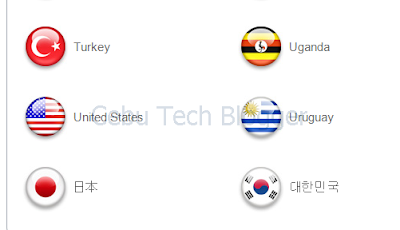
2. Scroll down iTunes until you see a small circle, a Philippine flag representing the current Store location you’re currently in (You may see a flag other than Philippines’ if you’re in other countries, obviously). Click on it.

3. iTunes will open the list of countries supporting the Store, just look for United States and click on it.

4. iTunes will open US Store, and from there – click the App Store tab.

You’ll see Google+ listed under Free Apps of the Top Charts.

Please note that you should not create a new account just yet. This is the main trick actually. Instead, download the app first. If you didn’t see Google+, just search for it and click to download in the result.


5. Now, you’ll be prompted to login or create a new account. Of course your Philippine iTunes account won’t be accepted, so just click Create New Account.

6. Provide Apple the required ID details, and click Continue.

7. In the next page, you’ll be asked to provide Payment Method. Make sure to select “None”.

Don’t select Credit Card payment method or even PayPal ‘coz iTunes is clever enough to detect you’re not in the US. For the Address fields, you can enter any US address. In my case, I entered Bert Padilla in the name fields, and enter just a valid or should I say, a verifiable US address which include City, State, ZIP code, and phone number.


It’s interesting really that you can even just ask Google for all the data needed in the address fields. Then click Continue.


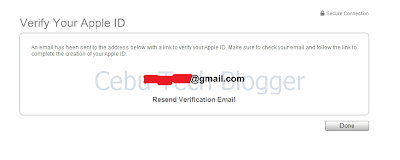
8. You’ll be asked to verify your new Apple ID. You may click "Done". And logon to the email address you registered in iTunes.

9. You’re done! You now have a verified Apple ID which you can use to download apps in US iTunes Store. Click Return to the Store and iTunes will then resume downloading Google+!

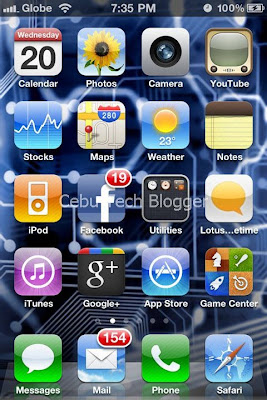
Here’s a screenshot of Google+ in my iPhone’s springboard.

This is cool, ain’t it?J


Update:

Seems like Google+ for iPhone keeps on crashing on iOS 4.3.3. I've updated the firmware to iOS 4.3.4 on my iPhone 4 and the app works seamlessly.


To receive latest technology updates, you can subscribe either by E-mail or by RSS Feeds. Follow me also on Twitter.

Rabu, 13 Juli 2011

Facebook App for Every Phone Released; Free Facebook Access in 90 days!

Official Facebook App for iPad? Not yet. Facebook preferred releasing an app that will work with over 2,500 different Java-enabled phones.

The app, called as Facebook for Every Phone, not only includes Facebook’s most popular features, such as News Feed, Inbox, and Photos, but also enables users to upload photos and find friends from the phone’s contacts. And the exciting part of this news is people will get to enjoy free access to this app for 90 days. Yes, you read it right. If you got a Java-enabled phones, you now have 3 months of free Facebooking! Sounds familiar? Well, this is actually a follow-up to the Facebook App for Feature Phones announced in January.


Here’s the catch though. The free data access to this new Facebook app is available globally; however, just to select carriers as listed below.

  • Aircel (India)

  • Airtel (India)

  • Banglalink (Bangladesh)

  • Beeline (Russia)

  • Celcom (Malaysia)

  • Etisalat (Egypt, Nigeria)

  • Globe (Philippines)

  • Idea (India)

  • O2 Telefonica (Germany)

  • Reliance (India)

  • Smart (Philippines)

  • Smartfren (Indonesia)

  • Telkomsel (Indonesia)

  • Three (Indonesia, United Kingdom)

  • TIM (Brazil)

  • TMN (Portugal)

  • Ufone (Pakistan)

  • Vodafone (Turkey)

After the 90-day period, of course you’ll be charged by your carrier based on how long you use the app. Facebook said though that this app has been optimized to use less data than other Java apps or mobile sites, so I guess there’s less to worry about.


So if your carrier is listed above, you can download the app by visiting m.facebook.com and scrolling down to the download link, or by entering d.facebook.com/install directly into your mobile browser. Facebook for Every Phone app is also available in app stores, including GetJar, Appia, and Mobile Weaver.


Kudos to Facebook! Now you have another reason to fight back against Google+! [via]


To receive latest technology updates, you can subscribe either by E-mail or by RSS Feeds. Follow me also on Twitter.

Rabu, 22 Juni 2011

Angry Birds Seasons: Summer Pignic for iPhone and Android Now Available

After launching a teaser trailer yesterday of the newest edition of Angry Birds Seasons, publisher Rovio officially released the game update for iPhone, iPod Touch, iPad, and Android users.

Themed for summer, the Angry Birds Seasons: Summer Pignic is tougher to play as gamers will only have one bird on each level to knock out the pigs. And like the Christmas edition, with Summer Pignic, you can only play additional levels every day for a month. Though it may sounds lame for those who want to unlock all levels right of the bat, the point is – Rovio wanted the game to be enjoyed that way.


Angry Birds Seasons: Summer Pignic is now available for download at iTunes App Store and Android Market. Rovio also says the update will be out for webOS and Symbian devices.


You may check out the trailer after the break.


To receive latest technology updates, you can subscribe either by E-mail or by RSS Feeds. Follow me also on Twitter.

Kamis, 16 Juni 2011

Yahoo App Search and AppSpot Help You Discover Apps for iPhone and Android Devices

Head to Yahoo.com today and there you’ll see a new search feature that will allow you to discover new and relevant apps for iPhone and Android devices based on your search query.


That’s actually what I discovered today.


Thinking that such feature is really new, I did a few more searches about it and there I found out Yahoo! did introduced and integrated Yahoo App Search to its existing Search Services. Not only that. Yahoo! also launched a new app for iPhone and Android called Yahoo AppSpot. Yahoo! AppSpot is a free mobile app that is compatible with iPhone, iPod Touch, iPad, and Android devices.


Yahoo AppSpot for iPhone
Yahoo App Search works by looking up relevant iPhone and Android apps based on search query from over 425,000 applications in Apple App Store, as well from the 200,000 apps in Android Market. It displays both free and paid apps, full comprehensive description and screenshots, with corresponding prices as well as star rating from users. The result page of Yahoo! App Search also features trending applications (probably based on number of downloads) so you would see other apps that would be of your interest.


Yahoo! AppSpot for Android
Yahoo! AppSpot works the same way, just that the interface is optimized for mobile devices. Among the best features include:


Daily Personal Picks: Unlike 'Top Apps' lists that provide the same apps day after day, you'll get new, personalized app suggestions on a daily basis, so you're always introduced to the latest, most interesting, and relevant apps.


More Precise Results: Using Yahoo!'s sophisticated search technology, quickly zero-in on an app by showing matching app titles as well as related keywords as you type.


Related Apps: Discover similar apps within the "more apps you'll love" section to find related apps that best match your needs.


At-a-Glance Shopping: Review the price, overall star ratings, screenshots, and description all on one screen to avoid the endless scrolling.


Fast & Easy Downloads: Direct links to the specific app pages within the Apple App Store or Android Marketplace make downloading an app a snap.


You can try Yahoo App Search by visiting apps.search.yahoo.com, and you can download AppSpot for iPhone and AppSpot for Android via the links. Note that AppSpot for iPhone is not available in Philippine Store just yet, but it can be downloaded from U.S. Store. Being said that, you'll need an Apple ID that is valid for purchase in US iTunes Store.


To receive latest technology updates, you can subscribe either by E-mail or by RSS Feeds. Follow me also on Twitter.

Senin, 30 Mei 2011

7 Free Apps to Download for Your Series 40 Nokia Handset

Got a Nokia phone running on Series 40 platform?

Of course the entire experience won’t be complete without adding great applications to your stash of apps – be it for social networking, game and entertainment, or just anything that will complement what could be the real experience of Series 40 Nokia handsets. Nokia phones like the Touch and Type Nokia X3-02, Nokia X2-00, Nokia X2-01, Nokia C3-00, and Nokia C2-01 are just among the handsets we’ve seen running on S40 – and if you’re among those who own one, here are 7 download-worthy apps you should check out at Nokia Ovi Store.

Ovi Browser Beta – This latest beta version has a new look, supports 85 languages and provides better mobile experience and more local content. Web browsing is fast and easy with patented Internet compression technology, allowing you to save money on data charges.


Foursquare – This social networking site helps you find new ways to explore the world around you. See where your friends are, learn about the places they frequent, keep track of all the things you want to do and learn about new things to experience from your friends!


Facebook Chat – For those who just can’t get enough of Facebook, Facebook Chat feeds your hunger for social networking by allowing you to catch up with your friends easily even on the go.


Dictionary & Translation Pro – You will never be lost for words with this app, which offers easy one-touch access to an extensive online English dictionary, thesaurus, and translation service, which supports a wide set of languages including Hindi, Arabic, French, German, Spanish, Italian, and many more. The online dictionary features near to million words and is constantly updated by a community of language professionals.


ForecaWeather – Get free weather updates with this app which provides current conditions, 10-day weather forecasts and various weather animations for any location worldwide. You can choose from over 140,000 hand-picked locations or you can retrieve forecasts for your current location using your phone’s GPS. You can also use Landmarks in your phone or you can enter a new location by coordinates.


Fat Effect – Want to know how you will look with extra 30-pound weight? Fat Effect can show you how. A fun app for those who don’t take things so seriously.


Age Effect – Find out how you will look after 30 years by clicking a photo, or you can take a snap of your friends and make fun of them with old age effect. You can also gather your friends for a group photo and see how you will all look after 30 years.


Already using this app? How do you find it? Do share your comments below. J


To receive latest technology updates, you can subscribe either by E-mail or by RSS Feeds. Follow me also on Twitter.

Rabu, 25 Mei 2011

Play Angry Birds in Your Chrome Browser, for FREE!

It was during the recent Google I/O event when the search giant announced that the most downloaded smartphone game app, Angry Birds, will be made available to Google Chrome users.


Angry Birds in Google Chrome
And the good thing is, it’s totally free. It was just earlier today that I’ve tried playing the game directly on my web browser, and being addicted to the game on my iPhone and Android devices let me think there’s no reason to stop myself from playing the web-based version. And I also thought I would be selfish if I won’t share it to you.


So here it is. All you have to do is just fire up your Google Chrome web browser (download here if you don’t have one), and hit this link to join the birds on their harsh cry. It’s full of fun, believe me. But I warn you not to waste most of your valuable time. J


To receive latest technology updates, you can subscribe either by E-mail or by RSS Feeds. Follow me also on Twitter.

Selasa, 08 Februari 2011

iPhone Confession App Approved by Roman Catholic Church, Will it Work?

Following Pope Benedict XVI’s message for the 45th World Communications Day in which he invited young people to make good use of their presence in the digital world, a new application for iPhone, iPod Touch, and iPad devices has been released and approved by The Catholic Church.


The app called Confession: A Roman Catholic App is designed as a “perfect aid for every penitent”. At a price tag of $1.99 per download at the Apple App Store, Confession brings a personalized examination of conscience for each user and a step-by-step guide to the sacrament. With support for password-protected accounts, the app has been developed by Little iApps, LLC (a new start-up company) and has been collaborated by notable personalities in the US Catholic circle. The first app to receive an imprimatur from a Bishop, Confession would invite Catholics to prayerfully prepare for and participate in the Rite of Penance.


Though this is seemingly a good idea for the faithful, criticisms are always there to point out whether this would really work. But so far, for being a “new media at the service of the Word” – the Confession app is said to already aid one man in returning to the sacrament after 20 years. Match with the Daily Gospel App, I guess that would seem to work better. What do you think? [via]


To receive latest technology updates, you can subscribe either by E-mail or by RSS Feeds. Follow me also on Twitter.

Minggu, 30 Januari 2011

Angry Birds Rio is Coming… and They Need Your Help!

Okay… Okay… Okay… You play Angry Birds, right? Well, so am I. I personally loved it. It’s incredibly addictive, yet not boring.

And if you think it will only end on your smartphones and tablet devices, you got yourself wrong. We already proved that. And what's more, Angry Birds will also hit on big screens, the theaters, comes April 15th this year. Exciting, eh?


Angry Birds maker, Rovio, together with the creators of ICE AGE, the 20th Century Fox - announced recently that they will be releasing an animated feature film entitled “RIO”. Starring Jesse Eisenberg, Anne Hathaway, Jamie Foxx, Tracy Morgan, and George Lopez – “Rio” will hit theaters this summer.


The storyline goes…

Not long after they arrive, Blu and Jewel are kidnapped by a group of bungling animal smugglers. With the help of street smart Jewel, and a group of wise-cracking and smooth-talking city birds, Blu escapes. Now, with his new friends by his side, Blu will have to find the courage to learn to fly, thwart the kidnappers who are hot on their trail, and return to Linda, the best friend a bird ever had.
Rio Trailer...


The story doesn't end there, Angry Birds fans, ‘coz prior to the release of the movie – a new version of this popular game called Angry Birds Rio will be available for download on your smart phones and tablets, basically iOS and Android-based devices. The game will come with 45 dedicated levels and with added new levels via updates. There’s no pricing details announced yet, but we’ll uncover that soon.

In Angry Birds Rio, the original Angry Birds are kidnapped and taken to the magical city of Rio, where they eventually escape their captors and set out to save their friends, Blu and Jewel – two rare macaws and the stars of the upcoming Fox motion picture, Rio. Angry Birds Rio will pair the physics-based gameplay of the original game with unique twists based on the highly-anticipated film.
Got a glimpse with the trailer and I realized the flocks really need our help. Can't imagine how badly they need your help? Hit the video after the break.


To receive latest technology updates, you can subscribe either by E-mail or by RSS Feeds. Follow me also on Twitter.