Tampilkan postingan dengan label Facebook. Tampilkan semua postingan

Kamis, 22 September 2011

Revert / Bring Back the Old Facebook Layout [How to]


Facebook’s layout just received a major facelift the other day and while the social network giant thought it would be another great improvement to offer better experience to its users, it may not always be the case.


Well, for me it is and I personally like the new layout; but there are really some users who got irked and aren’t that susceptible to the recent changes in Facebook. In fact some of them wanted to get back the old Facebook layout, which somehow can be done with a little catch. You can bring back the old layout; however that would involve changing your account’s local language setting. That is, changing the language to “Filipino” for Facebook users here in the Philippines. Yesterday, it still works for English UK but not until today. If you’re reading this outside the Philippines, you may try selecting your local language and see it for yourself if it works.


For the Pinoys, here’s how to revert to the old Facebook layout.


1.Logon to Facebook and go to the Account Settings.


2.At the bottom part, look for Language and click Edit.


3.Choose “Filipino” as primary language, then Save Changes.

Now go back to Facebook homepage and there you’ll see the old layout is back as shown below.


So, do you like it that way?


To receive latest technology updates, you can subscribe either by E-mail or by RSS Feeds. Follow me also on Twitter.

Jumat, 12 Agustus 2011

Facebook Launched Messenger App for iPhone, iPad, iPod Touch, and Android Devices

Just in case you missed it, Facebook launched a new messaging app for iPhone, iPad, iPod Touch, and Android devices the other day.

Called Facebook Messenger, this messaging application is actually a separate app from the native Facebook app for iPhone and Android. Basically it works as if it’s inspired by the BlackBerry Messenger or the Huddle feature in Google+. Features include:

  • Message friends, groups of friends or anyone in your mobile contacts

  • Map your location, find your friends and make plans on the go

  • Get mobile notifications so you never miss a message

  • Include photos so friends can see what you're doing

Facebook Messenger is already available for download at the App Store and Android Market. It’s currently not available at the Philippines App Store though, but I already have it on my iPhone by downloading the app using my US iTunes account. I’ll be using this Facebook messaging app starting today and let’s see if I like it.J[via]


To receive latest technology updates, you can subscribe either by E-mail or by RSS Feeds. Follow me also on Twitter.

Selasa, 09 Agustus 2011

Globe Telecom Also Offer Free Facebook Access on Java-Enabled Phones, Finally!

I’m not surprised. It’s quite obvious, folks.

You see… When Facebook announced its new Java App for Every Phone, Smart Communications and Globe Telecom were listed among those partner-carriers to offer its respective subscribers free data access to the social networking site. Smart confirmed the free service offer, while Globe Telecom said they don’t. Now that Smart subscribers are already taking advantage of this free Facebook access since last month, I thought it won’t make any sense for Globe if they don’t offer similar service. And I think I’m right, because by now up until October 31, 2011 – you should also be able to access Facebook for free through Globe’s network.


But before you get started, you’ll need to do few things.


First, send FB to 2910. You’ll receive an SMS from 2910 with a link to download the Facebook app (It’s actually at http://m/globe.com.ph/facebookapp). You’ll be asked to install the app in the succeeding steps.


You’re required to use MyGlobe Connect as your access point (APN Settings) when using the app, else standard rates may apply. If you have any concern, don't hesitate to leave a comment below.


To receive latest technology updates, you can subscribe either by E-mail or by RSS Feeds. Follow me also on Twitter.

Senin, 08 Agustus 2011

How to Install Mobile App for Java for Unlimited Access to Facebook [Smart Network]

I’m still receiving several queries on how to install the Java app that will allow unlimited access to the social networking site in Smart network.


I thought it would be great if I just post a tutorial for everyone’s reference.


As a primer for those who haven’t heard about this Java app, it’s actually called Facebook for Every Phone App that is only supported here in the Philippines by Smart. It’s an app that will allow Smart subscribers to access Facebook for free only until October 14, 2011. The app only works in over 2500 "dumb" phones, generally just those phones with support for mobile Java applications, yet doesn’t run a complete mobile OS. I’ve tested the app working seamlessly in mobile phones carrying Symbian platform particularly Series 40 and Series 60. At first, there’s no specific listing of supported devices though, making it hard to figure out which one really has a problem -- could it be the phone being unsupported, internet settings, or the app itself. Now at least we have it, so before you proceed with the tutorial below make sure your phone is listed here (Tip: Type Ctrl + F to search for your phone).


So we won't take this any longer. Here’s a tutorial that will install the app and configure supported devices. I thought this is the easiest one, so I suggest you follow the steps carefully to avoid possible errors.


How to Install Facebook for Every Phone App (I used Nokia 5250 here, folks.)


1. Using your Smart SIM, send FB to 211. Make sure you have extra load after sending. I suggest at least Php 10, though Smart requires you to have at least Php 1.
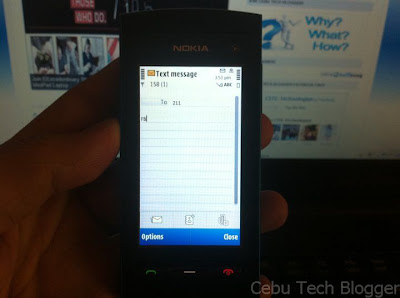


Click to enlarge
2. You will receive an SMS from 211, open it.
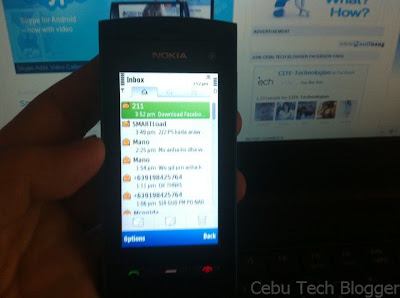


Click to enlarge
3. From text message, open the link http://fbapp.smart.com.ph to download Facebook Mobile App.
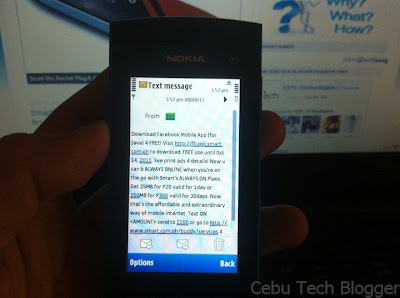


Click to enlarge
4. You’ll be prompted whether to download and install the file or not. Just select Continue.
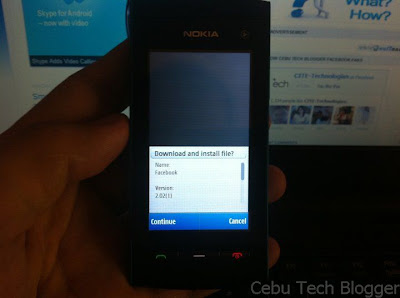


Click to enlarge
Technically, it will download the JAD file (Java Application Descriptor) which packed the Facebook installer.


5. A security warning may prompt, just select Continue.
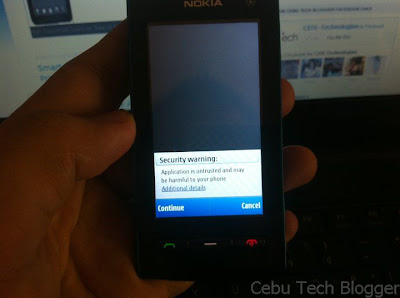


Click to enlarge
6. Select memory location where you want to install the app. I selected phone memory by default.
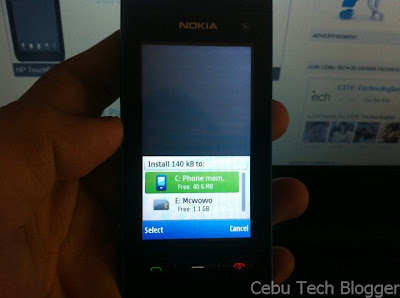


Add caption
7. It will continue downloading and install the app then. Once complete, you may select Start.


 8. But alternatively, you can also start the app by going to the Installed Apps directory of your phone. I chose this option. It’s usually located at: Menu > Applications > Installed Apps > Facebook
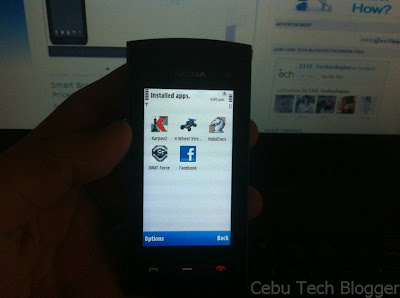


Click to enlarge
9. You will be prompted to allow application to use network. Just select Allow for this session to continue.
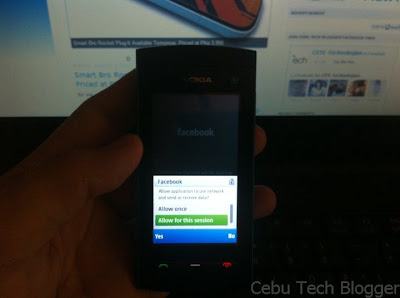


Click to enlarge
10. It will launch Facebook, test your connection, and you’ll be asked to login.
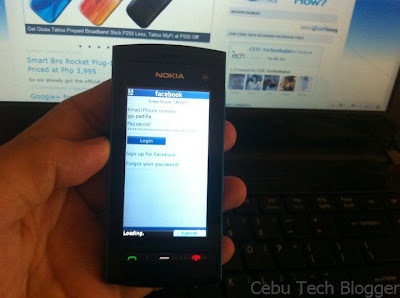


Click to enlarge
Note: Make sure you’ll see the text “Free from SMART” just below the Facebook logo. That will assure you won’t be charged a single cent for browsing.


11. During your first login, Facebook will ask you to find friends. I’m sure you won’t it at this point, so just select Skip at the lower-right portion of the interface.
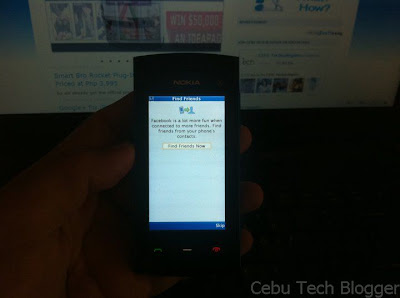


Click to enlarge
12. You’ll be redirected to the homepage where you will see most of the popular features of Facebook like News Feed, Messages, Events, Calendar, Photos, Friends, Profile, Search, and among others.
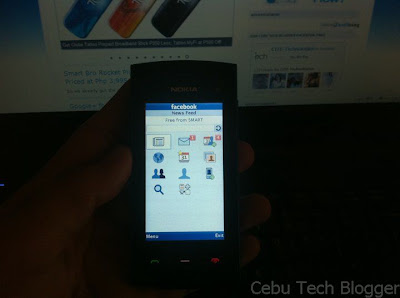


Click to enlarge
13. You’re done! At first I was confused how I can logout. But later I was able to figure out by selecting Menu link just right in the homepage or News Feed.
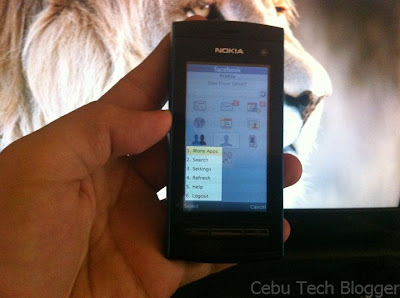


Click to enlarge
Final Note: Your phone may have a pre-installed native Facebook app. I strongly suggest that you don’t use it since it’s not the app supported by Smart. You’ll be charged if you use that app. Facebook for Every Phone App is located in the Installed Apps directory (Menu > Applications > Installed Apps > Facebook), and you have to launch FB from there to avail of the free service.


Hope this helps.


To receive latest technology updates, you can subscribe either by E-mail or by RSS Feeds. Follow me also on Twitter.

Kamis, 28 Juli 2011

The Man Without a Facebook [Video]

Got this video through Facebook which continues to go viral; it’s a parody spoofing Mel Gibson’s 1993 drama film The Man Without a Face.

The Man Without a Facebook is actually a tale of an introverted man who just hangs out with people face to face and trying to learn things without the help of, well…Google. Looks like this is going to be the movie of today’s generation, telling everyone how’s life sans social networks.


Check this out! [Thanks, Landoy!]


To receive latest technology updates, you can subscribe either by E-mail or by RSS Feeds. Follow me also on Twitter.

Minggu, 24 Juli 2011

Revert / Bring Back the Old Facebook Chat Interface [How to]

Tired and disappointed with the new changes rolled in Facebook chat interface recently? Well, so am I.


The good thing though, particularly in Google Chrome and Mozilla Firefox, there’s the Greasemonkey scripts which can customize web pages and some functionalities of web applications to meet the requirements of the users. Being said that, bringing back the old chat interface in Facebook is possible.


I reverted already the old Facebook chat interface in my personal Facebook account, and I thought some of you may also want to do the same. If so, just follow the steps below on how to get back the old Facebook chat interface.


Note: This trick will only work in Google Chrome and Mozilla Firefox.


1. First, download Greasemonkey extension. For Google Chrome users, you don’t need to download Greasemonkey since the Chrome browser natively supports the extension. Firefox users need to install Greasemonkey add-on and you can get it here.


2. Install Chrome / Firefox Facebook Sidebar Chat Reversion user script from here.

That’s it. You’re already done. Just refresh your browser to see the changes in Facebook interface.


Optional:


In Google Chrome, if you want to get back the old Facebook chat interface while in Incognito Mode, just tick the box that says “Allow in Incognito” under “Facebook Sidebar Chat Reversion” in Extensions (Settings > Tools > Extensions).

Bonus:


The old Facebook chat pop-out mode is still live. If you want to use it instead of modifying the new Facebook design with Greasemonkey script, just click on this link.


Here’s the screenshot of my Facebook profile with the new chat interface untouched.


Click to enlarge
And here’s the new one after installing Facebook Sidebar Chat Reversion user script. It’s the old Facebook chat interface you'll see in the lower-right.


Click to enlarge
It’s cool, isn’t it?


To receive latest technology updates, you can subscribe either by E-mail or by RSS Feeds. Follow me also on Twitter.

Minggu, 17 Juli 2011

Bummer! Globe Telecom Don’t Offer Free Access to Facebook through Mobile App for Java

A reader who commented on my previous post is probably right -- Globe Telecom don’t support Facebook for Every Phone App.


Facebook launched the app in partnership with several telcos in the world to offer free access to the social networking site in 90 days. Facebook for Every Phone App was designed to work specifically for Java-enabled phones, or phones that don’t run a complete mobile operating system.


It’s definitely good news for Globe and SMART subscribers here in the Philippines, since the two telcos were listed among those who will support the new service.


SMART confirmed the free service; however, being listed in Facebook’s announcement doesn’t mean final confirmation from the participating telcos. And that’s what we learned from Globe Telecom. Seems like Facebook listed Globe Telecom, but the telco denied its participation. In fact, Globe Telecom informed CTB that the promo is not official.

It reads:

Hi! We don't offer a free access to Facebook. We have a recent promo which ended last June 30, 2011 Super Facebook. You can register to SuperSurf to access the internet and social sites like Facebook: SUPERSURF gives you unlimited access to the Internet.
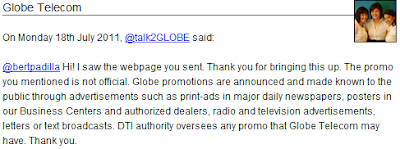
I saw the webpage you sent. Thank you for bringing this up. The promo you mentioned is not official. Globe promotions are announced and made known to the public through advertisements such as print-ads in major daily newspapers, posters in our Business Centers and authorized dealers, radio and television advertisements, letters or text broadcasts. DTI authority oversees any promo that Globe Telecom may have. Thank you.
There you got it, CTB readers. You can’t access Facebook for free through the mobile app for Java or Facebook for Every Phone app, just if you’re using Globe. So if you're Globe user, I suggest you stay away from using the app or else you'll end up losing credits.


Update: Globe Telecom is already offering this Free Facebook Access


To receive latest technology updates, you can subscribe either by E-mail or by RSS Feeds. Follow me also on Twitter.

Jumat, 15 Juli 2011

Update on SMART Free Facebook Access through Mobile App for Java

Three days ago, Facebook launched its new app for Java-enabled phones called Facebook for Every Phone App.

This Facebook app was designed to work seamlessly with over 2500 "dumb" phones, generally just those phones with support for mobile Java applications, yet doesn’t run a complete mobile operating system like iOS, Android, WP7, and latest versions of Symbian OS. And the good thing with this new app, Facebook is pushing it in partnership with several Telcos in the world to offer free access to the social networking site for 90 days. Here in the Philippines, Globe Telecom and Smart Communications are listed to offer free data access using the app.


For SMART users, you probably would love to hear that your network confirmed the support of the new service. Sent exclusively to CTB, a rep from SMART said that the network’s subscribers can download and use the said Facebook app from July 15th to October 14th, 2011 – free of charge. Read full quoted message below.

Hi!


Download and use of all Facebook services within the Facebook Mobile App for Java are FREE for Smart subscribers from Jul 15 to Oct 14, 2011.


However, please take note that clicking on any URL or 3rd party services (e.g. Snapstore) will lead you out of the application. Thus, usual data charges apply. You should have at least P1.00 maintaining balance to use the app. The app may be downloaded by sending FB to 211. Subscribers will receive text confirmation containing the download link of the app.


Also, they may click on the Facebook Mobile Application link in the Smart WAP site. Hope this helps.
Well, that sounds great for SMART!


Unfortunately, one reader commented on my previous post complaining Globe still deducts load credits when using the new Facebook app on his LG Chocolate phone. CTB was able to talk with Globe CSR yesterday and it seemed they have no idea about the service just yet. As of this writing, CTB is still waiting for Globe’s response concerning its confirmation to offer free access to Facebook when using the new app for Java-enabled phones. Just stay tuned!


Update 1: Globe Telecom Don’t Offer Free Access to Facebook through Mobile App for Java

Update 2: Here's a tutorial on How to Install Mobile App for Java for Unlimited Access to Facebook in Smart network.


To receive latest technology updates, you can subscribe either by E-mail or by RSS Feeds. Follow me also on Twitter.

Rabu, 13 Juli 2011

SMART and Globe Telecom Users, Here’s How to Enjoy Free Facebook Surfing in Dumb Phones

Nope. The right term is Feature Phone. So please don’t take dumb phones literally. But yeah, they aren’t that smart to do advance computing! J

Okay. Here in the Philippines, Sun Cellular subscribers have been enjoying unlimited Facebook access on feature phones since last year through Facebook Zero. It was announced that Facebook Zero is coming to Smart subscribers, but it appears it didn’t push through just yet. Eight months later, Facebook made available its app for features phones, partnering selected carriers in the world to offer free surfing for the first 90 days; however, Smart and Globe were not included in the list. But now, Facebook updated the app with a new set of partner-carriers to offer free data access for a limited time; and that includes Globe Telecom and Smart Communications! This is good news really, that every subscriber using a feature phone with support for Java apps would enjoy using Facebook with revamped interface, allowing users to access some of the popular features available on desktop version.


For you to learn more on how to download and use the app, hit the video after the break.

allowscriptaccess="always" allowfullscreen="true" width="520" height="334">


Note that Facebook for Every Phone App will work with over 2,500 different phones, so I’d bet yours is covered. Again, to echo the tutorial from the video above, you can download the app by visiting m.facebook.com and scrolling down to the download link, or by entering d.facebook.com/install directly into your mobile browser.


Enjoy! And of course do let us know how you find it.


Update 1: SMART confirmed to support free Facebook access using this app.

Update 2: Globe Telecom Don’t Offer Free Access to Facebook through Mobile App for Java


To receive latest technology updates, you can subscribe either by E-mail or by RSS Feeds. Follow me also on Twitter.

Facebook App for Every Phone Released; Free Facebook Access in 90 days!

Official Facebook App for iPad? Not yet. Facebook preferred releasing an app that will work with over 2,500 different Java-enabled phones.

The app, called as Facebook for Every Phone, not only includes Facebook’s most popular features, such as News Feed, Inbox, and Photos, but also enables users to upload photos and find friends from the phone’s contacts. And the exciting part of this news is people will get to enjoy free access to this app for 90 days. Yes, you read it right. If you got a Java-enabled phones, you now have 3 months of free Facebooking! Sounds familiar? Well, this is actually a follow-up to the Facebook App for Feature Phones announced in January.


Here’s the catch though. The free data access to this new Facebook app is available globally; however, just to select carriers as listed below.

  • Aircel (India)

  • Airtel (India)

  • Banglalink (Bangladesh)

  • Beeline (Russia)

  • Celcom (Malaysia)

  • Etisalat (Egypt, Nigeria)

  • Globe (Philippines)

  • Idea (India)

  • O2 Telefonica (Germany)

  • Reliance (India)

  • Smart (Philippines)

  • Smartfren (Indonesia)

  • Telkomsel (Indonesia)

  • Three (Indonesia, United Kingdom)

  • TIM (Brazil)

  • TMN (Portugal)

  • Ufone (Pakistan)

  • Vodafone (Turkey)

After the 90-day period, of course you’ll be charged by your carrier based on how long you use the app. Facebook said though that this app has been optimized to use less data than other Java apps or mobile sites, so I guess there’s less to worry about.


So if your carrier is listed above, you can download the app by visiting m.facebook.com and scrolling down to the download link, or by entering d.facebook.com/install directly into your mobile browser. Facebook for Every Phone app is also available in app stores, including GetJar, Appia, and Mobile Weaver.


Kudos to Facebook! Now you have another reason to fight back against Google+! [via]


To receive latest technology updates, you can subscribe either by E-mail or by RSS Feeds. Follow me also on Twitter.

Rabu, 06 Juli 2011

Video Calling in Facebook, Official!

So the early report is true, Skype brings video calling to Facebook.

Announced a moment ago, the biggest social network will offer its users a new way to communicate not just through an improved chat; but also with live conversation powered by Skype.

So a few months ago, we started working with Skype to bring video calling to Facebook. We built it right into chat, so all your conversations start from the same place. To call your friend, just click the video call button at the top of your chat window.
Facebook plans to roll the video calling feature to all users over the next few weeks, but you can actually have it ahead of the schedule. You can get it here now. [via]


To receive latest technology updates, you can subscribe either by E-mail or by RSS Feeds. Follow me also on Twitter.

Selasa, 05 Juli 2011

Amazing! Mark Zuckerberg is the Most Popular Person in Google+!

Believe it or not, the Facebook co-founder is the most popular user of Google+.

If popularity is based on the number of followers, socialstatistics.com tells it all. As of this writing, Mark Zuckerberg has 34,759 followers, leading Google’s co-founders Sergey Brin and Larry Page at 18,715 and 23,633, respectively.


Mark Zuckerberg co-founded Facebook in 2004, which made him to Forbes list of world billionaires. He currently has $13.5 billion worth of fortune. Facebook, for the record, is the biggest social network to date with estimated global users of 700-750 million. Though Facebook hasn’t confirmed the latest numbers yet, the company is expected to announce when it hits the 1-billion-users milestone.


A week ago, the search giant Google announced its own social network called Google+ (Plus). Google+ is considered as the new main rival of Facebook, with social features at its launch identical to the latter. Google+ is still on its beta stage and it hasn’t been rolled out to all Google users just yet. Being said that, number of total active users of the new social network has still yet to be known.


It’s really interesting to see Zuckerberg topping the list of Google+ most popular users, and though it appears he’s doing nothing with his profile, at least for those visible to the public, I’m sure he’s exploring what Google brought to it. He probably believes on the principle: To win a competition, one should know the competitor’s product. Right, Zuck?


To receive latest technology updates, you can subscribe either by E-mail or by RSS Feeds. Follow me also on Twitter.

Senin, 04 Juli 2011

Skype-Powered Video Chat Coming to Facebook

Several reports had surfaced in the web last week when Facebook CEO Mark Zuckerberg tipped off the press in the US that a new product described as “awesome” is coming to the biggest social networking site on July 6th.

Though not really enigmatic to the extent that both Facebook and Skype didn’t even say anything official on what to unveil this Wednesday, Mashable has reported they were able to confirm from unnamed sources that such “awesome” product is actually the integration of Skype to Facebook. That means we can expect an in-browser video chat on Facebook powered by Skype anytime soon. Facebook video chat is going to be a revolutionary feature mind you, that would go head to head with the Hangouts feature on the recently launched Google+.


There’s a great possibility though that Skype and Facebook will indeed enter into more integration of its services, in fact on the latest Skype 5.5 Beta client, one can instant message Facebook friends through Skype. If Facebook video chat comes into a reality through Skype, it also means the latter can leverage the social network’s user base to substantially ramp up its usage. Of course that's going to be a win-win partnership.


Surely, we’ll find out more on this report so just stay tuned! [via]


Update: Facebook Video Calling through Skype is Official.


To receive latest technology updates, you can subscribe either by E-mail or by RSS Feeds. Follow me also on Twitter.

Jumat, 20 Mei 2011

Facebook Scam Alert: Activate Dislike Button via HTC Sense

Dislike button on Facebook? No, there’s really nothing legit just yet.

And don’t let yourself get caught in a bait that will trick you to believing it does exist on Facebook. ‘Coz there’s none, believe me!

There’s a new scam spreading in Facebook like a wildfire. It updates your Facebook wall as if someone knowingly posted something interesting for you. It says:

Facebook just launched dislike button! Click on 'Activate Dislike Button' below to enable it on your account!
Sounds familiar, huh? Below the feed is the name of the app, via HTC Sense (feature that HTC smartphone users are enjoying) on this case that pushed update into your wall, as well as the usual “Like” and “Comment” links. But there’s a new one: Activate Dislike Button.


As usual, don’t click on that link. Clicking on the link will redirect users to a new page that give instructions which include copying several JavaScript codes and pasting in your browser’s address bar.


click to enlarge
It’s a trick. It will do something you’re not expecting, even making you mad. If you do so, you’ll apparently see the “Dislike” button on every update that you see in your wall. But no, it will asks you to complete surveys while turning your Facebook account into zombie; that is, sending the same Facebook message you've got in your wall. At least now you know, so don’t be fooled!


To receive latest technology updates, you can subscribe either by E-mail or by RSS Feeds. Follow me also on Twitter.

Senin, 28 Maret 2011

Aboitiz Power Alter Space Facebook Game Brings Awareness to Saving Mother Nature

Aboitiz Power unveiled Saturday at the Shangri-La’s Mactan Resort and Spa, the first Filipino-made Facebook game with an environmental advocacy.

Alter Space is a social networking game which aims to bring awareness on how people can lower carbon footprint and help preserve the Earth’s resources. Aboitiz Power, one of the major players in the Philippine power industry, also had a chance to introduce its own brand of clean and renewable energy called Cleanergy.


The Alter Space
The Alter Space Game


Like any other Facebook game applications, Alter Space has been designed with similar programming concepts with other casual games. But what brings Alter Space unique to the social crowd is its advocacy and cause to saving Mother Nature. Basically, the game could be another portal in the most popular social networking site to learning practical tips in an environment-friendly living as it let gamers know more about “carbon footprint” and how they can help lower its concentration in a day-to-day activities.


Playing Alter Space


Got to play again Alter Space the other day (Oh yeah, I’ve already played it before last Saturday’s event), and I realized it’s one of the most enjoyable activities everyone on Facebook should engage with, as far as casual games are concerned. Read on the synopsis below, hit this link to play the game, and do let us know what you think about it.

In Alter Space, you not only have your own virtual home but an entire planet to take care of. The choices you make during the game will determine whether your planet has more or less total carbon emissions. The objective of the game is to make choices and fulfill tasks that will increase your Happiness Level while ensuring that carbon emissions are kept to a safe amount.


You must fulfill certain tasks (cooking, taking a shower, buying food, going to the park, shopping, watching TV, using the computer, etc.) in order to increase his or her Happiness Level. Every time the Happiness Level reaches 100 per cent, your avatar goes up one game level. The game goes up to Level 5.


You must continuously earn “Currency” during the game. This is done by playing various mini-games. These mini-games involve harvesting energy from alternative sources: a solar power plant, a geothermal plant and a hydro-electric plant—all of which provide energy without carbon emissions.


Alter Space also includes details and touches that showcase Filipino culture, like buying food from a “turo-turo”; playing sungka; or using a pamaypay or fan, and many others.


Some practical tips you learn in Alter Space are: a) Using natural sunlight to brighten your house as much as possible; b) Using energy-saving light bulbs in the house; c) Using a pail of water when you bathe, instead of the shower; d) Using an LCD television set instead of the old CRT TVs; LCD TVs consume less energy and result in less carbon emissions.
To receive latest technology updates, you can subscribe either by E-mail or by RSS Feeds. Follow me also on Twitter.

Kamis, 20 Januari 2011

Facebook App Launched for Non-Smartphone Devices, Free Data Access on the First 90 Days

iOS, Android, BlackBerry OS, Windows Phone 7 – just to name few of the full range of mobile operating system rocking smartphones from Apple, RIM, Samsung, HTC, LG, Microsoft, and etc.


All of these devices are capable of providing better user experience due to its high-end computing ability as compared to non-smartphone devices or Feature Phones. And when we talk about getting connected with our favorite social networking sites like Facebook, we would prefer having an app installed on our smartphone rather than just by visiting directly on mobile sites. But for Facebook, it doesn’t end on leaving those who are still using Feature Phones, thinking how they’re compromised with the less-intuitive interface of Facebook for Mobile site.


Oh yes, Facebook App on Android, iPhone, BlackBerry, or Windows Phone 7, offers a better experience. But the question is how many are using smartphones of the entire mobile phone market? Well, according to The Nielsen Company in October last year – Feature Phones shared 70.3% of the total mobile phone market in the US alone, while 29.7% is shared by Smartphone devices. And that’s the reason why Facebook launched a new mobile app for the full gamut of your above-average Feature Phones.

Today, we're launching a new mobile app to bring Facebook to the most popular mobile phones around the world. The Facebook for Feature Phones app works on more than 2,500 devices from Nokia, Sony Ericsson, LG and other manufacturers, and it was built in close cooperation with Snaptu. The app provides a better Facebook experience for our most popular features, including an easier-to-navigate home screen, contact synchronization, and fast scrolling of photos and friend updates.
The Facebook for Feature Phones App can be downloaded by visiting m.fb.snaptu.com/f directly on your phone browser. It’s initially available to 14 mobile operators, and similar to Facebook Zero, the app will allow you to access Facebook for free for the first 90 days since it has been launched. These mobile operators include:


(Launching today)


Dialog (Sri Lanka)

Life (Ukraine)

Play (Poland)

StarHub (Singapore)

STC (Saudi Arabia)

Three (Hong Kong)

Tunisiana (Tunisia)

Viva (Dominican Republic)

Vodafone (Romania)


(Launching soon)


Mobilicity (Canada)

Reliance (India)

Telcel (Mexico)

TIM (Brazil)

Vivacom (Bulgaria)


There’s no Telco listed from the Philippines as of the moment though, surely we’ll let you know once we got updates on this. So, you’re still rocking your Feature Phone? Try this new Facebook App and do let us know what you think about it.


Update: Facebook for Every Phone Released


To receive latest technology updates, you can subscribe either by E-mail or by RSS Feeds. Follow me also on Twitter.

Selasa, 04 Januari 2011

Facebook Apps for iPad

That rumored second generation iPad is about to come, but until now the most popular social networking site, Facebook, still has no dedicated app for the first Apple slate.


Yes, there’s the Facebook for iPhone app – but some reports it doesn’t work that great on the iPad. The good thing is there are those independent developers who always try to find solid ways to use Facebook on iPad.


First up is Friendly for Facebook by Oecoway, Inc. It’s the first unofficial Facebook app for iPad (I think) which continue to become a hit, receiving positive reviews from its users.


Friendly UI
Features include:

  • Swipe through Facebook photos full screen

  • Chat with your online friends

  • Upload/Download Photos

  • Easy switch between multiple Facebook accounts

  • Secure your Facebook Account with a PIN Code access

  • Customize colors and fonts to your liking

Here comes another challenger which was just updated early this week – the Facepad. Though first claimed to have a stunning and interactive interface, looks like the older version is sluggish and buggy as users claim - even worse that it crashes on iOS 3.2 during start up. Nevertheless, some of those issues have been addressed in the new version which also supports iOS 4.0 or later.


Facepad UI
Features of Facepad include:

  • Swipe-based navigation

  • Dedicated photo browser

  • External link/embedded video player

  • Quick Links (Profile, Live/News Feed, Friends, etc)

Though these two are not the best Facebook apps for iPad, still you can give it a try. Of course do let us know what you think about it. Don’t ‘ya? Or if you think I missed your favorite unofficial Facebook app for iPad, hit me in the comment section. Surely, I’ll look at it!


To receive latest technology updates, you can subscribe either by E-mail or by RSS Feeds. Follow me also on Twitter.

Senin, 06 Desember 2010

Facebook is Rolling Out New Profile

Did you notice something new on Facebook today? If not, well – check out my profile here (add me first!J). It actually looks like the screenshot below.


click to enlarge
Facebook is currently rolling out new profile layout to its users. The new profile begins with a quick summary of who you are, from what you’re doing now to where you grew up. And the recently tagged photos show your friends what you’ve been up to. Though privacy settings have not changed, still only those people you’ve allowed to view photos you’re tagged in will see these photos. You can hide individual photo by hovering on it and clicking “X” on the upper-right portion of the photo.


Your list of friends is now arranged vertically on the left pane. Other information is displayed on the right pane, which includes adverts and etc. The chat window is still located on the lower right corner of the new layout.


With the new profile, you will be able to navigate from one central place, making it easier to get to your info, photos, videos and more. Check out the video after the break to see how the new profile looks like.


You may want to try it, but of course – do let us know in the comment section below what you can say about the new Facebook profile layout.


To receive latest technology updates, you can subscribe either by E-mail or by RSS Feeds. Follow me also on Twitter.