Tampilkan postingan dengan label Baseband Unlock. Tampilkan semua postingan

Senin, 20 Juni 2011

Gevey Ultra SIM Unlocks iPhone 4 Without Dialing 112

The problem with Gevey Turbo SIM is it can unlock iPhone 4 basebands, but users need to dial 112 as part of the process.

112 is an emergency number in which dialing it in other countries could be illegal. Being said that, some iPhone users may have second thought of using it as an alternative baseband unlocking solution to a more popular and widely used software-based Ultrasn0w.


Anticipating such concern, the SIM Interposer maker Gevey, has released a new Gevey Ultra SIM which can unlock iPhone 4 without dialing 112. The Gevey Ultra SIM has a more streamlined process of unlocking basebands 1.59.00, 2.10.04, 3.10.01, and 4.10.01 on iOS firmware including iOS 4.0, 4.1, 4.2.1, 4.3, 4.3.1, 4.3.2, 4.3.3, and even iOS 5.0. For Gevey Ultra SIM to work, users need to jailbreak the iPhone 4 and install the FuriousMod package from cydia.furiousmod.com repository.


Below is the demo of using Gevey Ultra SIM, courtesy of ApplenBerry – one of the distributors of Gevey products. The Ultra SIM is said to be available soon at a price of $28. No release date yet, but we’ll keep you posted once it’s already available.


To receive latest technology updates, you can subscribe either by E-mail or by RSS Feeds. Follow me also on Twitter.

Kamis, 17 Maret 2011

Gevey iPhone 4 SIM Can Unlock Baseband 2.10.04, 3.10.01 on iOS 4.1, 4.2.1, and 4.3

Now that iOS 4.3 is out for iPhone 4 users, what’s next for the unlockers?

We understand that the software-based unlock from the iPhone Dev Team for basebands 2.10.04 and 3.10.01 won’t probably be coming out until they released an untethered jailbreak for iOS 4.3, despite discovering an exploit for the said basebands. Yet, we still don’t have specifics when the next baseband unlock would be coming. It’s just really a matter of time, and soon the Dev Team will bring something good news for unlockers in the jailbreaking community.


But for those who really can’t wait for the next software-based unlock (could it still be Ultrasn0w?), a team from China behind what is called a Gevey SIM, published images and videos showing how they managed to unlock iPhone 4 basebands 2.10.04 and 3.10.01 on iOS 4.1 and iOS 4.2.1 (iOS 4.3 could be vulnerable too) – just by using a SIM card. The specialized SIM is called “SIM Interposer” by which Laforet of Singularity blog explained everything behind the baseband unlocking action in detail.


Below is the video showing two carrier locked iPhone 4 running on different iOS firmware versions, and have been unlocked just by using the Gevey SIM.


How did It Work?

SIM card holds many different types of information, but the part most involved with carrier lock is the IMSI number, which is a unique code that corresponds to your account in the mobile carrier's database.


A sample IMSI might look like this


310 150 987654321


The first two segments are known as Mobile Country Code (MCC) and Mobile Network Code (MNC) respectively, and in the example above the IMSI indicate the SIM is from USA (310) AT&T (150).


When the iPhone baseband is loaded into memory, it checks the MCC and MNC against its own network lock state stored in the seczone. If the combination is allowed, the cell radio is activated and vice versa.


The earliest iPhone baseband revisions only check IMSI twice following a restart, therefore it is very easy to send spoof information in order to bypass the check. Nevertheless, the baseband was soon updated to validate SIM more aggressively and the method soon became obsolete.
What does it mean to unlockers?

1. It works if A.your network handles 112 calls properly according to the GSM standard; B.they are tolerant to TSMI spoofing and does not actively validate your SIM again for incoming calls.

2. Unlike its ancestors, the i4 SIM interposer is not a drop-in-and-forget device. The exact precedure must be performed should the device restart, lose reception for an extended period of time or move to another PLMN. In all situations the TMSI expires and has to be obtained again. Theoretically it is possible for a daemon to automate the process similar to ZeroG, but that only makes thing more convoluted.

3. It is, without question, unethical or downright illegal to use the technique anywhere 112 is a legitimate emergency number. Not a huge issue in China where the number is only used for informative purpose; the providers have no immediate incentive to fix the loophole.

4. All firmware/baseband combinations for the i4 up to iOS4.3 are vulnerable; however the exploit may be patched in any future software updates or via the carrier. If apple can influence providers to block Lydia it is not impossible for them to press them to fix the exploit. The only way to permanently unlock your baseband is via NCK.

5. SIM interposer should not harm your phone hardware; however your network could request IMEI and identify your device during the emergency call. Your identity cannot be faked and it is possible that they will ban your account. There is a reason why SIM cards remain legally the property of the service provider: you are not supposed to tamper with them without breaching contract.

6. Notwithstanding all the problems, SIM interposer does not cause any battery drain since it is only active transiently, nor would it cause signal loss because it does not change cellular transmission other than the initial validation step.
Albeit being legally questionable, an initial price of the Gevey SIM is at US$50, but the official pricing is still yet to be announced when it go on sale comes March 18th to 21st. Stay tuned as I'm going to let you know once it's officially out. So anyone buying?


Update: Gevey SIM is now being sold online for US $75.


To receive latest technology updates, you can subscribe either by E-mail or by RSS Feeds. Follow me also on Twitter.

Senin, 28 Februari 2011

iPhone 4 Baseband Unlock on 3.10.01 and 2.10.04 [Update]

It has been too long, really, since the very first iPhone 4 user had been stuck on baseband 2.10.04 which is until now still can’t be unlocked using the latest version of Ultrasn0w.


Those who got their iPhone 4 pre-installed with iOS 4.2 or iOS 4.2.1 or those who accidentally upgraded the firmware to the said version without using the TinyUmbrella tool or without upgrading to a custom firmware, are also facing the same problem since iOS 4.2.1 come with baseband 3.10.01 which is also not unlockable just yet.


Given the long wait for the unlock of the said iPhone 4 basebands to be released, some users are desperately claiming the iPhone Dev Team actually has never found any exploit on baseband 3.10.01 or 2.10.04. However, it seems like baseband hacker @sherif_hashim has something good news for you. And believe me, he could be your knight in the shining armor.


A Twitter follower of @sherif_hashim asked him if he has found an exploit for baseband 3.10.01, but it looks like there’s something more than what had been asked. Sherif responded implicating that he found an exploit that will work both for basebands 3.10.01 and 2.10.04. Though there’s no ETA mentioned, a wilder analysis reveals it would be after a week or two when Apple released iOS 4.3, probably this March. Could it be part of the March 2 event? We don’t know yet. But of course, we won’t let the story pass without bringing it to you. Take a deep breath, and optimistically think the iPhone Dev Team has the new Ultrasn0w unlock already on queue. We'll let you know for more updates, so just stay tuned!


To receive latest technology updates, you can subscribe either by E-mail or by RSS Feeds. Follow me also on Twitter.

Rabu, 16 Februari 2011

Sn0wbreeze 2.2 is Out, Jailbreak iOS 4.2.1 Untethered on iPhone, iPod Touch, and iPad

It didn’t take that long, folks, since we had been teased yesterday.

ih8sn0w already released the next version of its jailbreaking tool, Sn0wbreeze 2.2, which enables iPhone, iPod Touch, and iPad to update or restore to a pre-jailbroken custom iOS 4.2.1 firmware, utilizing the kernel-based GreenPois0n exploit on iOS 4.2.1 by the Chronic Dev Team. It also preserves baseband of iPhone devices so users can later unlock the baseband using Ultrasn0w.


Sn0wbreeze 2.2 support devices including:


iPhone 3G

iPhone 3GS

iPhone 4

iPod Touch 2G

iPod Touch 3G

iPod Touch 4G

iPad


You can download Sn0wbreeze 2.2 directly from ih8sn0w website. I’ll be posting a detailed tutorial on how to jailbreak your iDevice using Sn0wbreeze 2.2, so just stay tuned for updates…


Update: Sn0wbreeze has been updated to version 2.2.1. Sn0wbreeze 2.2.1 jailbreaks iOS 4.2.1 and iOS 4.2.6 that comes with Verizon iPhone 4. It also fixes iBooks and adds Drag and Drop IPSW firmware support.


To receive latest technology updates, you can subscribe either by E-mail or by RSS Feeds. Follow me also on Twitter.

Selasa, 15 Februari 2011

PwnageTool 4.2 for Mac Released, Jailbreak iPhone 4/ 3G / 3GS/ Verizon, iPod Touch 3G / 4G, iPad, and AppleTV 2G on iOS 4.2.1 Untethered

Following the release of the latest version of Greenpois0n for Mac and Windows which can jailbreak iPhone 3GS and iPhone 4 untethered on iOS 4.2.1 as well as iPhone 3G, iPod Touch 3G, iPod Touch 4G, iPad, and AppleTV 2G- the iPhone Dev Team had just released earlier today the latest version of its tool called PwnageTool 4.2.

Pwnage Tool 4.2 is a jailbreak tool that will allow users to create a custom iOS 4.2.1 firmware and at the same time, retain the current unlockable baseband of the iPhone. That is, users only have to restore to that pre-jailbroken custom iOS 4.2.1 firmware, yet getting the same untethered jailbreak with preserved unlockable baseband. Supported devices running iOS 4.2.1 include:


iPhone 3G

iPhone 3GS

iPhone 4

iPhone 4-Verizon

iPod Touch 3G

iPod Touch 4G

iPad

AppleTV 2G


The Dev Team says they released PwnageTool 4.2 since Apple has already patched the exploit in the latest iOS 4.3 betas, and the move really makes sense. PwnageTool is dedicated only for Mac users; however, its Windows-equivalent, the Sn0wbreeze 2.2, is also under way. For the meantime, go check out the download link below after the break. [via]


PwnageTool_4.2.dmg --> PwnageTool_4.2.dmg.6176918.TPB.torrent

SHA1 Sum = af365f5de19d7ee19cbe1c67b2f226996a46b3ac


To receive latest technology updates, you can subscribe either by E-mail or by RSS Feeds. Follow me also on Twitter.

Sn0wbreeze 2.2 Coming Soon…Upgrade iPhone 4, 3GS, and 3G to Custom iOS 4.2.1 Firmware with Unlockable Baseband

iPhone users and jailbreakers, I got exciting news for you here!

Images of the new interface of Sn0wbreeze started to show up in the web and it highlights new feature that will allow iPhone 4, iPhone 3GS, and iPhone 3G users to upgrade to custom iOS 4.2.1 firmware, yet still preserving the unlockable baseband using Ultrasn0w. The new version is called Sn0wbreeze 2.2 Version 2.2r1. Basically, it’s being developed since the current version, Sn0wbreeze 2.1, won’t suffice and is limited only to creating a custom iOS 4.1 firmware.


For the sake of those who are new to Sn0wbreeze, it’s a tool designed for Windows users (Mac version is called PwnageTool) which will enable iPhone users to create a custom iOS firmware that is already jailbroken untethered, and also preserve the unlockable baseband of your device. In layman’s term, the Sn0wbreeze 2.2 will take in charge of the quite complicated process of jailbreaking iOS 4.2.1 on iPhone 4 or 3GS using Greenpois0n or Redsn0w and then unlocking its baseband using Ultrasn0w. Everything is already packed on what is said to be a custom iOS firmware, in which you can then use for your iPhone.


Update: Sn0wbreeze 2.2 is Out, Jailbreak iOS 4.2.1 Untethered on iPhone, iPod Touch, and iPad


Though there’s no ETA indicated, I have a strong feeling that developer @iH8sn0w will release the tool anytime soon. For the meantime, check out the photos after the break (for your viewing pleasure!) and don’t forget to subscribe for the latest updates.


Sn0wbreeze 2.2 UI


Modes as seen on Sn0wbreeze 2.2 UI


Other notable features on Sn0wbreeze 2.2
To receive latest technology updates, you can subscribe either by E-mail or by RSS Feeds. Follow me also on Twitter.

Senin, 07 Februari 2011

Unlock iPhone 4 Baseband on iOS 4.2.1

Just awhile ago, I posted a detailed tutorial on how to Jailbreak iPhone 4 and iPhone 3GS on iOS 4.2.1 using Greenpois0n RC5.

Such tutorial provides an untethered jailbreak for supported devices. Those who followed the tutorial probably did jailbreak their device for the first time; and it would somehow even more helpful if I include a tutorial on how to unlock baseband particularly for iPhone 4 users. And that's what I'm going to teach you on the guide below right after the overview.


Overview:


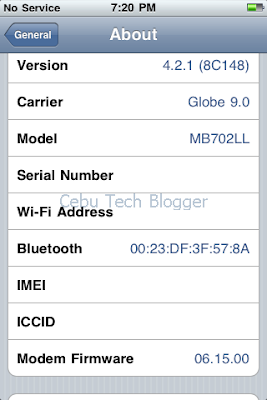
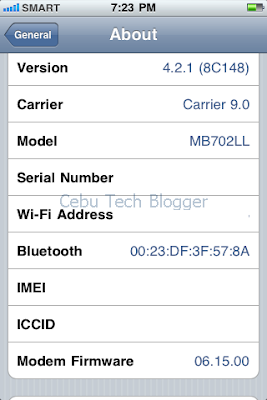
Unlocking the baseband or modem firmware of any iPhone goes along almost the same processes and steps, and also uses the popular tool, the Ultrasn0w. Only that it matters on which firmware or iPhone software (IPSW) a particular baseband comes with. So far, the unlockable baseband on iPhone 4 is 01.59.00. It’s the baseband included in the first release of iOS 4.0, to iOS 4.0.1, and finally on iOS 4.0.2.


When iOS 4.1 has been released, iPhone 4 baseband has been updated also to 02.10.04. The next firmware update, iOS 4.2 and iOS 4.2.1 brought the iPhone 4 baseband 3.10.01 which for the time being – these two iPhone 4 basebands can’t be unlocked using the latest version of Ultrasn0w.


In my step-by-step guide in Jailbreaking iOS 4.2.1 on iPhone 4, I emphasized that you should have your device upgraded to iOS 4.2.1 before running Greenpois0n. And I reiterated not to upgrade directly using iTunes, but instead use the latest release of TinyUmbrella if you need the unlockable baseband. TinyUmbrella will upgrade your iPhone firmware to iOS 4.2.1, but will prevent from updating your iPhone baseband. That is, you will retain the 01.59.00 baseband which is still unlockable using the latest version of Ultrasn0w.


If you are now running a jailbroken iOS 4.2.1 on your iPhone 4 with baseband 01.59.00 and don’t know how to unlock the baseband, follow the steps below.


Unlock iPhone 4 Baseband on iOS 4.2.1


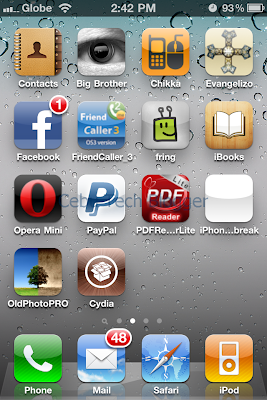
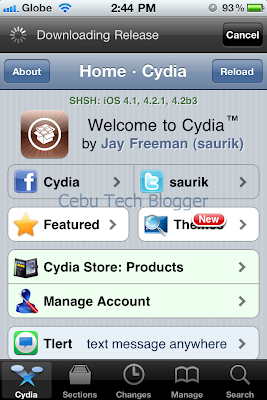
1.Launch Cydia from the iPhone SpringBoard.


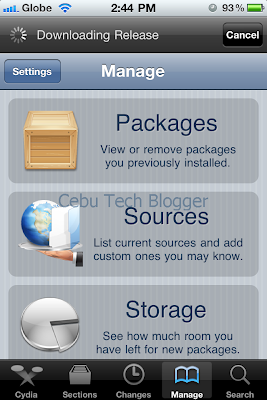
2. Tap Manage at the lower portion of the screen.


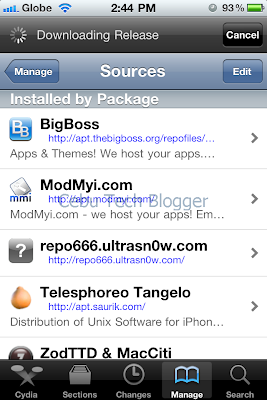
3. Tap the Sources button.


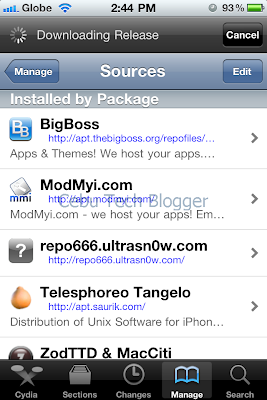
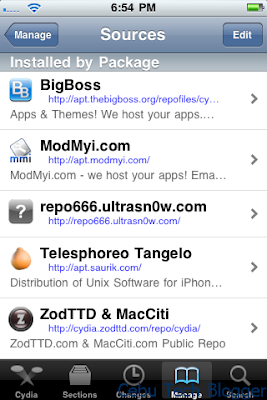
4. On the list of sources, check if the Ultrasn0w repo is present.


If it’s not present, follow 4.xx steps below. If it’s present, proceed to step 5.


4.1 Tap Edit on the upper-right side of the screen.

4.2 Press Add on the upper-left of the screen.

4.3 Enter http://repo666.ultrasn0w.com/ in the URL box that popped out.

4.4 Then tap Add Source button.

4.5 Once the source is added, press Return to Cydia.

4.6 Hit Done on the upper-right portion of the screen.


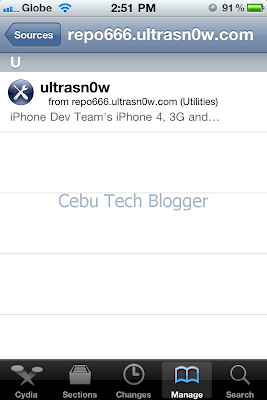
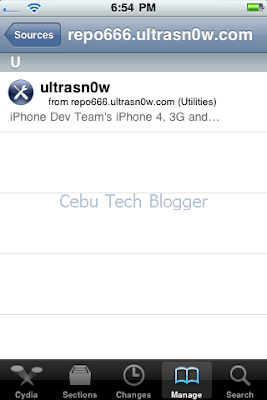
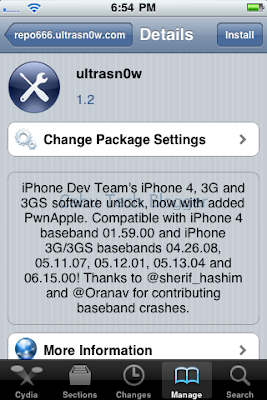
5. Tap to select repo666.ultrasn0w.com from list of sources.

6. Tap to select Ultrasn0w.


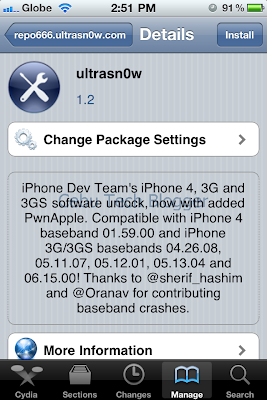
7. Hit Install on the upper-right portion of the screen.


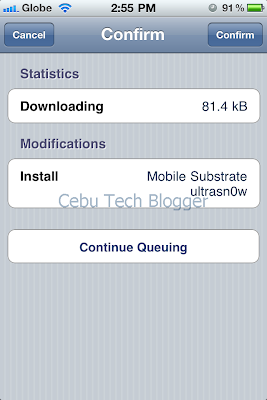
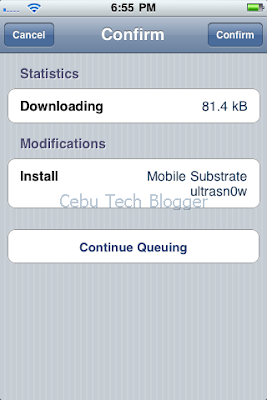
8. Press Confirm to install Ultrasn0w 1.2.


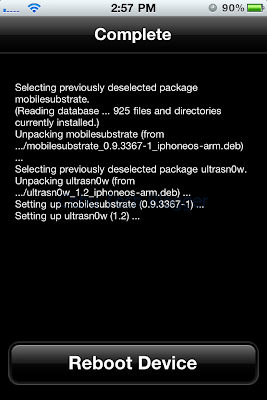
9. Once complete, you will be asked to reboot your iPhone 4. Just tap “Reboot Device” and you’re done.


Now, you would be able to use any SIM card of your choice for your iPhone 4.


To receive latest technology updates, you can subscribe either by E-mail or by RSS Feeds. Follow me also on Twitter.

Minggu, 23 Januari 2011

iPhone 3G Unlocked at Baseband 6.15.00 for Life, Downgrade to 5.13.04 in the Works

Just recently, Apple seeded the second beta of iOS 4.3 to developers and as expected- it doesn’t come with any support on iPhone 3G anymore.

This means that those who were able to unlock iPhone 3G at baseband 6.15.00 will have it for life.

Because there's no 4.3 beta for iPhone3G, it's effectively unlocked for life via the 06.15 ultrasn0w unlock
– said MucleNerd of the iPhone Dev Team via Twitter.


Though there is still the GPS issue on the device when using the iPad baseband 6.15.00; users need to downgrade the baseband of their device to earlier versions to fix the issue. The good news is it looks like the downgrade hack we’ve learned a month ago even became more imminent. MuscleNerd confirmed that they are working on a fix in which those iPhone 3G users at baseband 6.15.00 would be able to downgrade to baseband 5.13.04.


At least this would give another hope to our friends out there who are still using iPhone 3G, yet with compromised GPS functionality. Stay tuned folks as we’ll let you know once the Dev Team provides us updates on the workarounds on the said hack.


To receive latest technology updates, you can subscribe either by E-mail or by RSS Feeds. Follow me also on Twitter.

Sabtu, 11 Desember 2010

Downgrade from Baseband 6.15.00 to 5.15.04 or 5.14.02, Imminent!

iPhone 3G and 3GS users, those who took the risk of upgrading their iPhone baseband from 5.14.02 or 5.15.04 to 6.15.00 (iPad 3.2.2 baseband) – there’s something good news for you.


The Dev Team first warned that users who have their iPhone 3G or 3GS stuck on baseband 5.14.02 or 5.15.04 have to upgrade their baseband to 6.15.00 for them to be able to unlock their iDevice. But you have to accept the fact that you cannot downgrade to lower baseband anymore.


It appears that the story will change. The Dev Team is working on an imminent method to downgrade baseband on iDevices, according to the recent tweet of @MuscleNerd from the iPhone Dev Team.

Well, this is actually extremely good news for those who have been longing for such method. Surely, I’ll let you know once the Dev Team provided us some updates. Stay tuned!


Update 1: iPhone 3G Unlocked at Baseband 6.15.00 for Life, Downgrade to 5.13.04 in the Works.


To receive latest technology updates, you can subscribe either by E-mail or by RSS Feeds. Follow me also on Twitter.

Rabu, 08 Desember 2010

Unlock Baseband 5.14.02 and 5.15.04 on iPhone 3G or 3GS Running iOS 4.2.1

Some iPhone 3G and 3GS users are still stuck on baseband 5.14.02 that came with iOS 4.1, or on baseband 5.15.04 that was shipped with iOS 4.2.1.

Perhaps you might one of those who accidentally upgraded to any of those latest firmwares and wanted to get out of those basebands you’re trapped- so you can still continue using your iPhone. Well, there’s actually a way to “indirectly” unlock baseband 5.14.02 and 5.15.04 on iPhone 3G and 3GS. You’ll need to update your baseband to 6.15.00 and finally use the latest version of Ultrasn0w to unlock that baseband. Updating to this baseband can be done by ticking the check box (Install iPad baseband) on Redsn0w interface when going to jailbreak iOS 4.2.1. Check out the screenshot below.


"Install iPad baseband" to upgrade to 6.15.00
But before you do that, you need to understand the following consequences.


1. The iPhone Dev Team said that there’s no way to come back down from baseband 6.15.00. That means you can’t downgrade to lower baseband versions once you do the upgrade, and that will definitely void your warranty!


Update: Downgrade from Baseband 6.15.00 to 5.15.04 or 5.14.02, Imminent!


2. If some future baseband comes out with a critical fix, you won’t be able to update to it if it remains down in 5.xx sequence. Not a big deal though as you are only after of the baseband 6.15.00 being unlocked.

3. Starting on iOS 4.2.1, you won’t be able to restore to stock firmware once your iPhone already has the 6.15.00 baseband. Your only option is to restore to custom firmware.

4. You are most likely to encounter GPS issues on baseband 6.15.00.


If you are willing to accept the above consequences, then you’re good to get out from baseband 5.14.02 or 5.15.04, update to 6.15.00, and finally unlock through the latest version of Ultrasn0w.


How to unlock iPhone 3G and 3GS Baseband 6.15.00 Using Ultrasn0w 1.20


1. Launch Cydia from the iPhone SpringBoard.

2. Tap Manage at the lower portion of the screen.

3. Tap the Sources button.

4. On the list of sources, check if the UltraSn0w repo is present.


If it’s not present, follow 4.xx steps below. If it’s present, proceed to step 5.


4.1 Tap Edit on the upper-right side of the screen.

4.2 Press Add on the upper-left of the screen.

4.3 Enter http://repo666.ultrasn0w.com/ in the URL box that popped out.

4.4 Then tap Add Source button.

4.5 Once the source is added, press Return to Cydia.

4.6 Hit Done on the upper-right portion of the screen.


5. Tap to select repo666.ultrasn0w.com from list of sources.

6. Tap to select Ultrasn0w.


7. Hit Install on the upper-right portion of the screen.


8. Press Confirm to install Ultrasn0w 1.2.


9. Once complete, press Restart SpringBoard.


Your iPhone baseband 6.15.00 is already unlocked!

Extend your thanks to the Dev Team! J


If you have something in mind, do leave a comment below.


To receive latest technology updates, you can subscribe either by E-mail or by RSS Feeds. Follow me also on Twitter.