Tampilkan postingan dengan label Ultrasn0w. Tampilkan semua postingan

Minggu, 23 Januari 2011

iPhone 3G Unlocked at Baseband 6.15.00 for Life, Downgrade to 5.13.04 in the Works

Just recently, Apple seeded the second beta of iOS 4.3 to developers and as expected- it doesn’t come with any support on iPhone 3G anymore.

This means that those who were able to unlock iPhone 3G at baseband 6.15.00 will have it for life.

Because there's no 4.3 beta for iPhone3G, it's effectively unlocked for life via the 06.15 ultrasn0w unlock
– said MucleNerd of the iPhone Dev Team via Twitter.


Though there is still the GPS issue on the device when using the iPad baseband 6.15.00; users need to downgrade the baseband of their device to earlier versions to fix the issue. The good news is it looks like the downgrade hack we’ve learned a month ago even became more imminent. MuscleNerd confirmed that they are working on a fix in which those iPhone 3G users at baseband 6.15.00 would be able to downgrade to baseband 5.13.04.


At least this would give another hope to our friends out there who are still using iPhone 3G, yet with compromised GPS functionality. Stay tuned folks as we’ll let you know once the Dev Team provides us updates on the workarounds on the said hack.


To receive latest technology updates, you can subscribe either by E-mail or by RSS Feeds. Follow me also on Twitter.

Sabtu, 11 Desember 2010

Downgrade from Baseband 6.15.00 to 5.15.04 or 5.14.02, Imminent!

iPhone 3G and 3GS users, those who took the risk of upgrading their iPhone baseband from 5.14.02 or 5.15.04 to 6.15.00 (iPad 3.2.2 baseband) – there’s something good news for you.


The Dev Team first warned that users who have their iPhone 3G or 3GS stuck on baseband 5.14.02 or 5.15.04 have to upgrade their baseband to 6.15.00 for them to be able to unlock their iDevice. But you have to accept the fact that you cannot downgrade to lower baseband anymore.


It appears that the story will change. The Dev Team is working on an imminent method to downgrade baseband on iDevices, according to the recent tweet of @MuscleNerd from the iPhone Dev Team.

Well, this is actually extremely good news for those who have been longing for such method. Surely, I’ll let you know once the Dev Team provided us some updates. Stay tuned!


Update 1: iPhone 3G Unlocked at Baseband 6.15.00 for Life, Downgrade to 5.13.04 in the Works.


To receive latest technology updates, you can subscribe either by E-mail or by RSS Feeds. Follow me also on Twitter.

Rabu, 08 Desember 2010

Unlock Baseband 5.14.02 and 5.15.04 on iPhone 3G or 3GS Running iOS 4.2.1

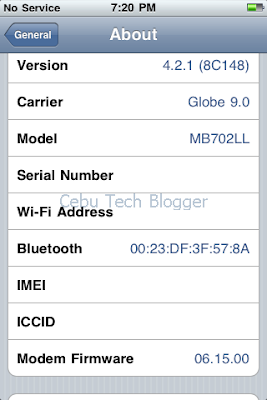
Some iPhone 3G and 3GS users are still stuck on baseband 5.14.02 that came with iOS 4.1, or on baseband 5.15.04 that was shipped with iOS 4.2.1.

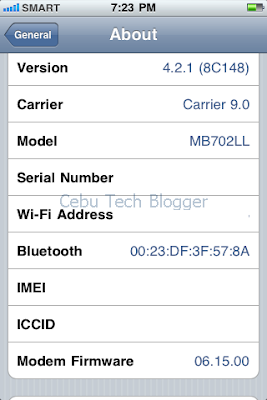
Perhaps you might one of those who accidentally upgraded to any of those latest firmwares and wanted to get out of those basebands you’re trapped- so you can still continue using your iPhone. Well, there’s actually a way to “indirectly” unlock baseband 5.14.02 and 5.15.04 on iPhone 3G and 3GS. You’ll need to update your baseband to 6.15.00 and finally use the latest version of Ultrasn0w to unlock that baseband. Updating to this baseband can be done by ticking the check box (Install iPad baseband) on Redsn0w interface when going to jailbreak iOS 4.2.1. Check out the screenshot below.


"Install iPad baseband" to upgrade to 6.15.00
But before you do that, you need to understand the following consequences.


1. The iPhone Dev Team said that there’s no way to come back down from baseband 6.15.00. That means you can’t downgrade to lower baseband versions once you do the upgrade, and that will definitely void your warranty!


Update: Downgrade from Baseband 6.15.00 to 5.15.04 or 5.14.02, Imminent!


2. If some future baseband comes out with a critical fix, you won’t be able to update to it if it remains down in 5.xx sequence. Not a big deal though as you are only after of the baseband 6.15.00 being unlocked.

3. Starting on iOS 4.2.1, you won’t be able to restore to stock firmware once your iPhone already has the 6.15.00 baseband. Your only option is to restore to custom firmware.

4. You are most likely to encounter GPS issues on baseband 6.15.00.


If you are willing to accept the above consequences, then you’re good to get out from baseband 5.14.02 or 5.15.04, update to 6.15.00, and finally unlock through the latest version of Ultrasn0w.


How to unlock iPhone 3G and 3GS Baseband 6.15.00 Using Ultrasn0w 1.20


1. Launch Cydia from the iPhone SpringBoard.

2. Tap Manage at the lower portion of the screen.

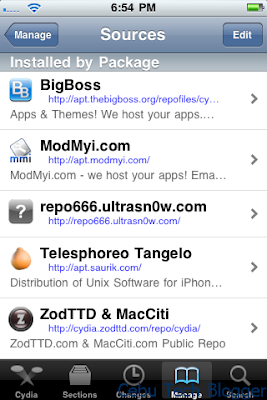
3. Tap the Sources button.

4. On the list of sources, check if the UltraSn0w repo is present.


If it’s not present, follow 4.xx steps below. If it’s present, proceed to step 5.


4.1 Tap Edit on the upper-right side of the screen.

4.2 Press Add on the upper-left of the screen.

4.3 Enter http://repo666.ultrasn0w.com/ in the URL box that popped out.

4.4 Then tap Add Source button.

4.5 Once the source is added, press Return to Cydia.

4.6 Hit Done on the upper-right portion of the screen.


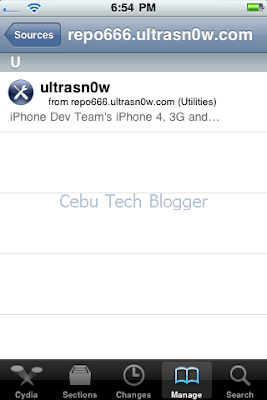
5. Tap to select repo666.ultrasn0w.com from list of sources.

6. Tap to select Ultrasn0w.


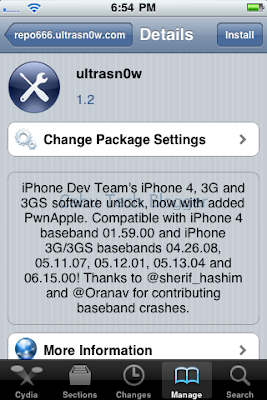
7. Hit Install on the upper-right portion of the screen.


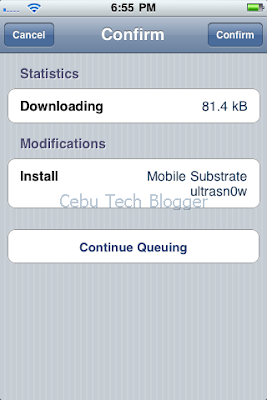
8. Press Confirm to install Ultrasn0w 1.2.


9. Once complete, press Restart SpringBoard.


Your iPhone baseband 6.15.00 is already unlocked!

Extend your thanks to the Dev Team! J


If you have something in mind, do leave a comment below.


To receive latest technology updates, you can subscribe either by E-mail or by RSS Feeds. Follow me also on Twitter.